Follow these steps to set up KeyShot Pro Floating and register your floating licence.
Set up KeyShot Pro Floating
1. Download and install the KeyShot Pro Floating application from the KeyShot download page.
2. Open KeyShot.
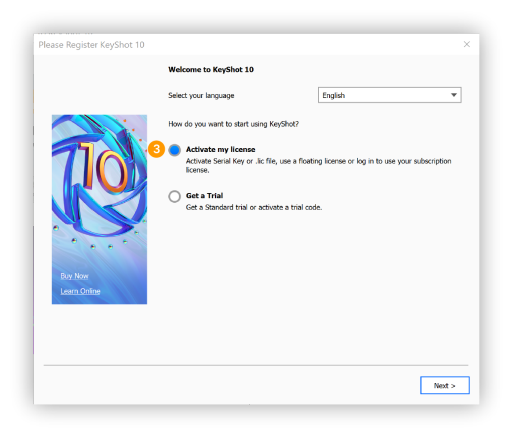
3. Select Activate my licence and click Next.
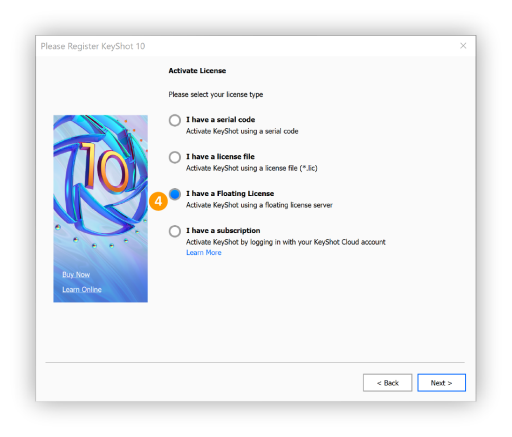
4. Select I have Floating License and click Next.
5. Enter your licence server's hostname or IP address. If the server uses a FlexLM port other than the standard port (27000), enter the port number, then "@", then the server's hostname or IP address.
For example:
- Hostname: 27000@KeyShotServer.local
- IP Address: 27000@192.168.1.123
6. Click Connect.
7. Review your licence features, select the licence type you want to use and choose whether you need KeyShotWeb. Click Finish.
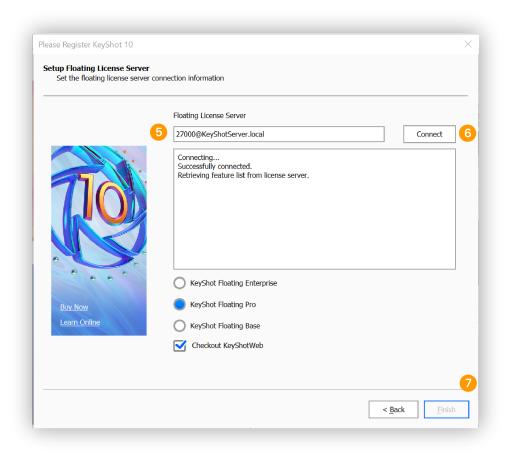
KeyShot Pro Floating starts and saves the server information. You can check out a licence as long as your computer can connect to the licence server.
Switch to another floating licence
If you have multiple floating licences, you can switch between them in the floating licence settings. Open the settings from the main menu.
- Windows: Help > Floating licence settings…
- Mac: KeyShot > Floating licence settings…
Choose the floating licence you need and restart KeyShot.
Switch from another licence type
To switch from a trial or another licence type, open the registration dialog from the main menu.
- Windows: Help > Activate license…
- Mac: KeyShot > Activate license…
Continue from step 3 above.