AI Assistant
The AI Assistant () brings access to AI-powered workflows without leaving SketchUp. To get started with AI Assistant, open SketchUp AI () and select AI Assistant or from the menu by selecting Extensions > AI Assistant.
Last updated 17 July 2026
The AI Assistant (  ) brings access to AI-powered workflows without leaving SketchUp. To get started with AI Assistant, open SketchUp AI (
  ) and select AI Assistant or from the menu by selecting Extensions > AI Assistant .
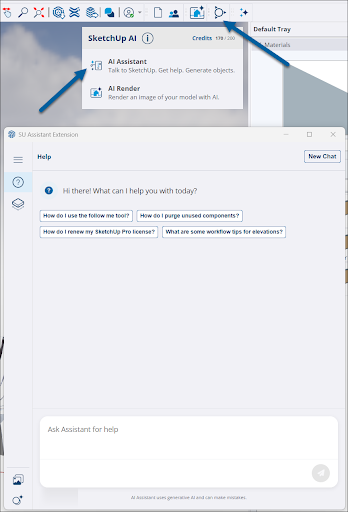
AI Assistant offers a few different ways to bring AI into your workflow:
- Help (
 ) – Ask questions about tools, best practices, or even complex workflows and get in-app guidance.
 - Generate Object (
 ) – Enter text prompts or provide your own image and add prompts to create 3D objects with photoreal materials.
- After generating an object, your output saves to the AI Assistant Gallery (
 ).
).
- After generating an object, your output saves to the AI Assistant Gallery (
- Click Credits (
 ) to check the balance of your SketchUp AI Credits .
Still need help?
Technical support from our New Zealand team is available to customers with a current Procadsys SketchUp Plus subscription: Pro Plus, Pro Scan Plus, Pro Civil Contractor Plus, Advanced Workflows Plus or Studio Plus. Self-help articles are public.
Contact SketchUp support