Use Extension Warehouse's search options to find an extension, even if you do not know its name.
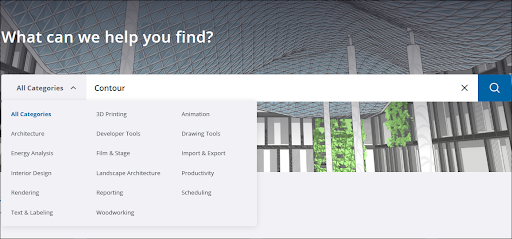
Search from the Home page, or click Search ( ) in the header on any page. Enter an extension name or describe the type of extension you need. To search within a category, use the dropdown next to the search bar to choose from these options:
- All Categories
- 3D Printing
- Animation
- Architecture
- Developer Tools
- Drawing Tools
- Energy Analysis
- Film & Stage
- Import & Export
- Interior Design
- Landscape Architecture
- Productivity
- Rendering
- Reporting
- Scheduling
- Text & Labeling
- Woodworking
After entering a search term, selecting a category or both, click Search to see your results.
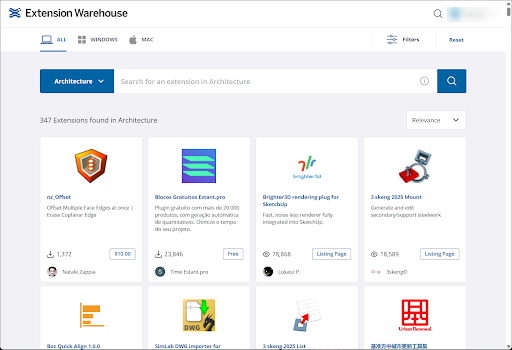
Use these options on the results page to refine your search:
- Use the All, Windows and Mac tabs at the top of the page to filter extensions by operating system.
- Click Filters to see these options:
- SketchUp Version – Choose your SketchUp version to find compatible extensions.
- Extension Type – Choose Free, Fixed Term, Perpetual or Listing Pages.
- Use the dropdown menu to sort by Relevance, Price: Low to High, Price: High to Low, Created: New to Old or Created: Old to New.
- Click Reset. to reset your filtering and sorting options.