Display Panel
The Display () panel helps you control hidden geometry in your model. The Unhide section help you control hidden geometry with the following options:
Last updated 17 July 2026
The Display (  ) panel helps you control hidden geometry in your model.
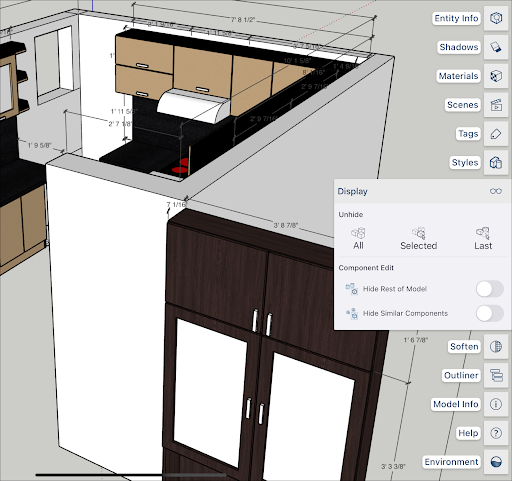
The Unhide section help you control hidden geometry with the following options:
- All unhides all hidden geometry.
- Selected unhides only the current selection.
- Last unhides the last piece of geometry chosen to hide.
Component Edit contains two togglable options:
- Hide Rest of Model , when toggled on, hides everything in your model except the selected component.
- Hide Similar Components hides any components similar to the selected component.
For more information about manipulating hidden geometry see the Hiding Geometry section of Softening, Smoothing, and Hiding Geometry .
Still need help?
Technical support from our New Zealand team is available to customers with a current Procadsys SketchUp Plus subscription: Pro Plus, Pro Scan Plus, Pro Civil Contractor Plus, Advanced Workflows Plus or Studio Plus. Self-help articles are public.
Contact SketchUp support