Skip to content
07-848 2005

SketchUp, SketchUp for Web and iPad

Outer Shell tool

Use the Outer Shell tool in SketchUp for iPad to remove geometry inside overlapping groups or components and keep only the outer faces. The tool has no optional tool modes.

On this page
  1. iPad input methods for the Outer Shell tool
  2. Click-Move-Click mode or Just Draw mode

The Outer Shell tool (Outer Shell tool icon.) removes geometry inside overlapping groups or components, leaving only the outer faces.

In SketchUp for iPad, the Outer Shell tool has no optional tool modes.
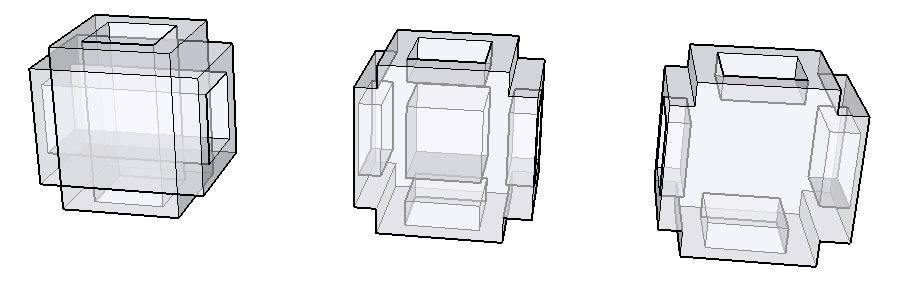
Overlapping groups and two views of the outer shell after the Outer Shell tool removes internal geometry.

iPad input methods for the Outer Shell tool

You can use the Outer Shell tool with any SketchUp for iPad input method in either Just Draw or Click-Move-Click mode.

Click-Move-Click mode or Just Draw mode

Mouse or Trackpad: Select the Outer Shell tool. Click your first solid, then click your second solid.

Pencil or Multitouch: Select the Outer Shell tool. Tap your first solid, then tap your second solid.

For more help with the Outer Shell tool, see Creating an outer shell in Modeling Complex 3D Shapes with the Solid Tools.

Adapted from SketchUp Help Center documentation: Outer Shell tool. © 2026 Trimble Inc.

Procadsys customer support

Still need help?

Licences, renewals and billing

Our New Zealand team looks after your SketchUp licences, renewals and invoices.

Monday to Friday, 9:00 am to 4:30 pm NZ time, excluding New Zealand public holidays.

Technical problems

Technical support from our New Zealand team is available with a current Procadsys SketchUp Plus subscription: Pro Plus, Pro Scan Plus, Pro Civil Contractor Plus, Pro Advanced Workflows Plus or Studio Plus.

Initial response within one business day.

On another SketchUp plan? Technical problems go to Trimble support.