Skip to content
07-848 2005

SketchUp, SketchUp for Web and iPad

SketchUp for iPad

Create, edit and mark up 3D projects with SketchUp for iPad. Work on your 3D models on-site, on the go or in the office.
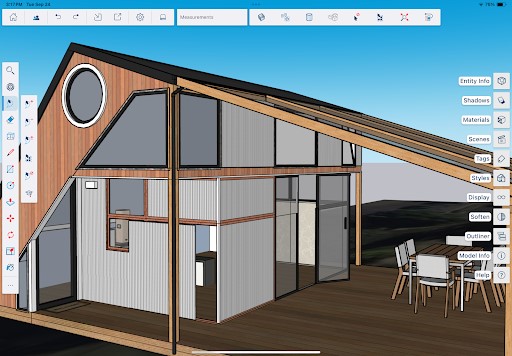
Create, edit and mark up 3D projects with SketchUp for iPad. Work on your 3D models on-site, on the go or in the office.

SketchUp for iPad shows a 3D house model with drawing tools and controls for Materials, Scenes and Styles.

What You Need: SketchUp for iPad works with a range of iPad models and requires iPadOS 17 or higher. Check the System Requirements for details.

Your Models, Anywhere: You can open, share and manage your models in SketchUp for iPad. Use Trimble Connect to access files from other versions of SketchUp, save files locally on your iPad or use your favourite cloud storage app. See Working With SketchUp Files for help managing models across devices and apps.

Let's Go! Learn the basics with Getting Started with SketchUp for iPad.

Adapted from SketchUp Help Center documentation: SketchUp for iPad. © 2026 Trimble Inc.

Procadsys customer support

Still need help?

Licences, renewals and billing

Our New Zealand team looks after your SketchUp licences, renewals and invoices.

Monday to Friday, 9:00 am to 4:30 pm NZ time, excluding New Zealand public holidays.

Technical problems

Technical support from our New Zealand team is available with a current Procadsys SketchUp Plus subscription: Pro Plus, Pro Scan Plus, Pro Civil Contractor Plus, Pro Advanced Workflows Plus or Studio Plus.

Initial response within one business day.

On another SketchUp plan? Technical problems go to Trimble support.