Uninstalling or Repairing SketchUp
UninstallTo uninstall SketchUp, please see Uninstalling SketchUp where you can find step-by-step instructions for both Windows and Mac users.RepairWindows users can run SketchUp's Repair option to help with missing or corrupt files, broken shortcuts, or registry errors.Note: A repair option is not available to iOS
Last updated 17 July 2026
Uninstall
To uninstall SketchUp, please see Uninstalling SketchUp where you can find step-by-step instructions for both Windows and Mac users.
Repair
Windows users can run SketchUp's Repair option to help with missing or corrupt files, broken shortcuts, or registry errors.
To repair your installation of SketchUp, follow these steps:
- Open Settings and select Apps.
- Select Installed Apps and locate Sketchup.
- Click the context menu and select Modify . SketchUp's installation options will open.
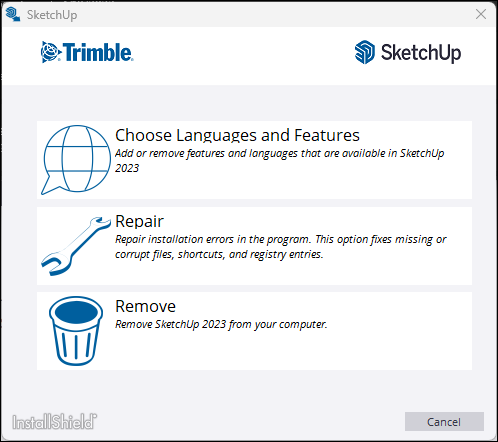
- Select Repair to begin. The repair process may take several minutes to complete.
- Select Finish .
Still need help?
Technical support from our New Zealand team is available to customers with a current Procadsys SketchUp Plus subscription: Pro Plus, Pro Scan Plus, Pro Civil Contractor Plus, Advanced Workflows Plus or Studio Plus. Self-help articles are public.
Contact SketchUp support