Trimble Connect Visualizer is a Trimble Connect Workflow Extension that lets you create navigable 3D renders of SketchUp models in a web browser or with a PCVR device. Access is included in the Trimble Connect benefits available to SketchUp subscribers.
You can access Trimble Connect Visualizer through Trimble Connect for Desktop or the Trimble Connect Visualizer SketchUp Extension.
Download Trimble Connect Visualizer for Windows
You can download Trimble Connect Visualizer from the menu in Trimble Connect.
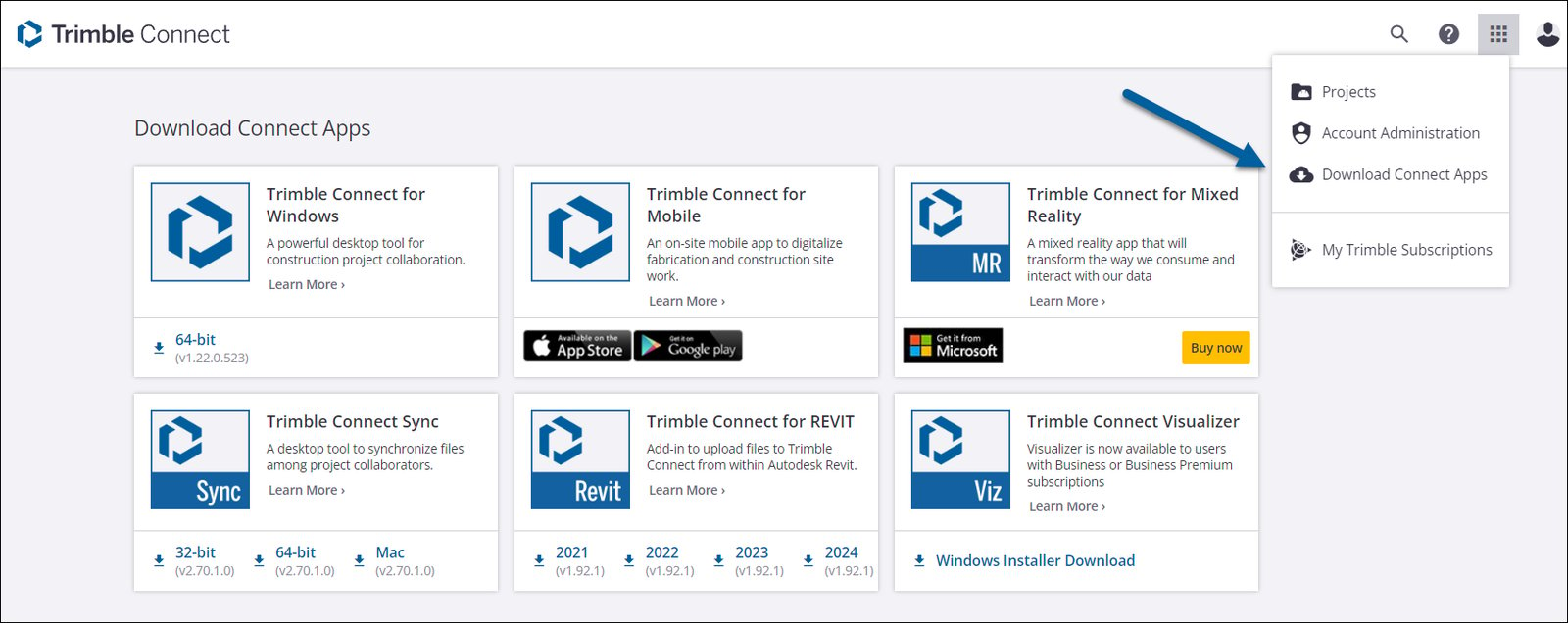
To download Trimble Connect Visualizer:
- Open the menu in Trimble Connect.
- Select Download Connect Apps.
- Find the Trimble Connect Visualizer tile and select Windows Installer Download.
- Find and open the downloaded file to start installation.
- Follow the instructions in the installer.
Trimble Connect Visualizer SketchUp Extension
Trimble Connect Visualizer is available as an extension in Extension Warehouse. Open Extension Warehouse in SketchUp and search for "Trimble Connect Visualizer", or select the link for your operating system:
Use Trimble Connect Visualizer
Watch this video overview to see what you can do with the Trimble Connect Visualizer extension:
For more details, see Using Trimble Connect Visualizer.