SketchUp for Web's Tools
SketchUp for Web provides all the tools you need to create great 3D models. To help you get started, we'll introduce you to the interface and where to find your favorite modeling tools.Tools and Where to Find ThemSketchUp for Web’s tools appear on the left side of the interface.
Last updated 17 July 2026
SketchUp for Web provides all the tools you need to create great 3D models. To help you get started, we'll introduce you to the interface and where to find your favorite modeling tools.
Tools and Where to Find Them
SketchUp for Web’s tools appear on the left side of the interface. Tools are separated into a Main Toolbar and an Expanded Toolset.
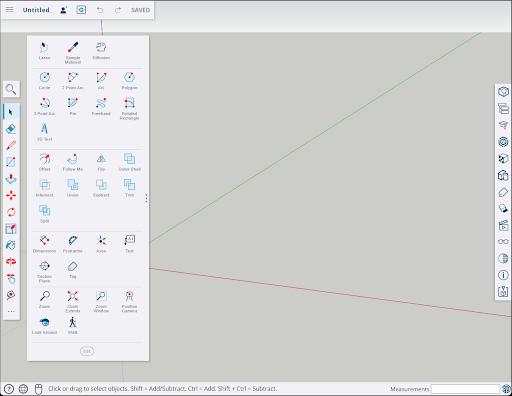
The Main Toolbar contains some of SketchUp’s most commonly used tools. For more details see SketchUp for Web's Main Toolbar .
Clicking  opens the Expanded Toolset, home to all other available tools. See SketchUp for Web's Expanded Toolset for more information, including how to edit and customize both the Expanded Toolset and the Main Toolbar.
Still need help?
Technical support from our New Zealand team is available to customers with a current Procadsys SketchUp Plus subscription: Pro Plus, Pro Scan Plus, Pro Civil Contractor Plus, Advanced Workflows Plus or Studio Plus. Self-help articles are public.
Contact SketchUp support