SketchUp for Web's Main Toolbar
When opening a model you'll see the Main Toolbar appears on the left side.
Last updated 17 July 2026
When opening a model you'll see the Main Toolbar appears on the left side.
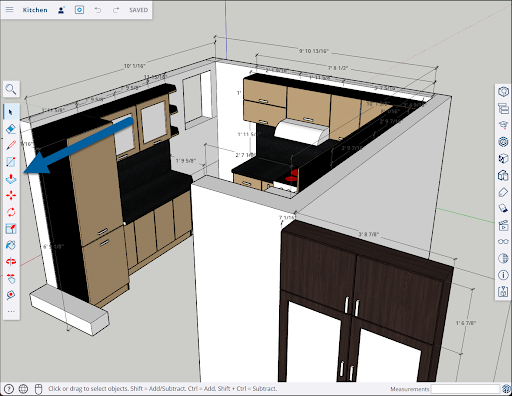
The top icon is Search SketchUp (  ). Clicking Search SketchUp opens a search bar. Clicking Help (
  ) in the search bar opens a list of search controls. For more detailed information on how Search works, see Search for Tools and Commands .
The Main Toolbar contains the following tools:
Icon | Tool Name | Shortcut | Learn More |
| Select | Space Bar | |
| Eraser | E | |
| Paint Bucket | B | |
| Pencil | L | |
| Rectangle | R | |
| Push/Pull | P | |
| Move | M | |
| Rotate | Q | |
| Scale | S | |
| Tape Measure | T | |
[IMAGE: /sites/help.sketchup.com/files/images/go-icon-orbit.jpg] | Orbit | O | |
| Pan | H |


For the rest of your tools, see SketchUp for Web Expanded Toolbar .
Still need help?
Technical support from our New Zealand team is available to customers with a current Procadsys SketchUp Plus subscription: Pro Plus, Pro Scan Plus, Pro Civil Contractor Plus, Advanced Workflows Plus or Studio Plus. Self-help articles are public.
Contact SketchUp support