Use materials, textures and environments to add colour, images, surface detail and lighting to your SketchUp model.
SketchUp's default materials support Physically Based Rendering (PBR) texture maps. These maps simulate surface properties such as roughness and metalness. You can use a basic colour with transparency or a detailed material, such as Mediterranean floor tiles with deep grout lines. Use white to represent kitchen counters or grey for sinks. For more detail, choose materials that simulate textured wall paint or the finish of wood panelling on a floor.
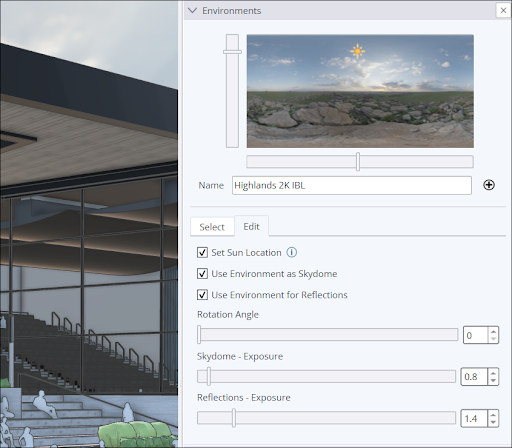
An environment adds lighting and surroundings to SketchUp's photoreal materials. Material textures respond to the direction and quality of the light and reflect the virtual surroundings. This helps show surface details such as cladding texture and the finish of wood panelling.
Use these articles to work with materials, textures and environments:
- Adding an Environment to a Model explains how to use the Environments panel's default collection, adjust environments and import your own.
- Navigating the Materials Panel explains how to find, manage and create materials for your SketchUp models.
- Applying Materials explains how to apply a material with the Paint Bucket tool and the Materials panel.
- Replacing a Material explains how to use the Materials panel to replace one material in your model with another.
- Create Your Own Materials explains how to create a material from your own images.
- Editing Materials explains how to customise a material using the options in the Materials panel's Edit tab.
- Generate Textures explains how an AI service creates and adds textures to turn a basic material into a photoreal material.
- Positioning Textures explains how to wrap or project an image texture around an entity, such as a box or cylinder, or project a texture onto a curved surface.
- Managing and Organizing Materials explains how to use the Materials panel to track materials in your model, remove unwanted materials, and manage or create collections.
- Calculating Material Area explains how to use the Materials panel to calculate the surface area painted with each material.
- Importing and Using 2D Images explains how to import and use a 2D image in your model.