Chaos Vantage
CarPaint Material
This page provides details about the CarPaint material available for creation in Chaos Vantage.
Last updated 28 February 2026
This page provides details about the CarPaint material available for creation in Chaos Vantage.
Overview
The CarPaint material is a material that simulates a metallic car paint. The material allows the adjustment of each of these layers separately.

Parameters

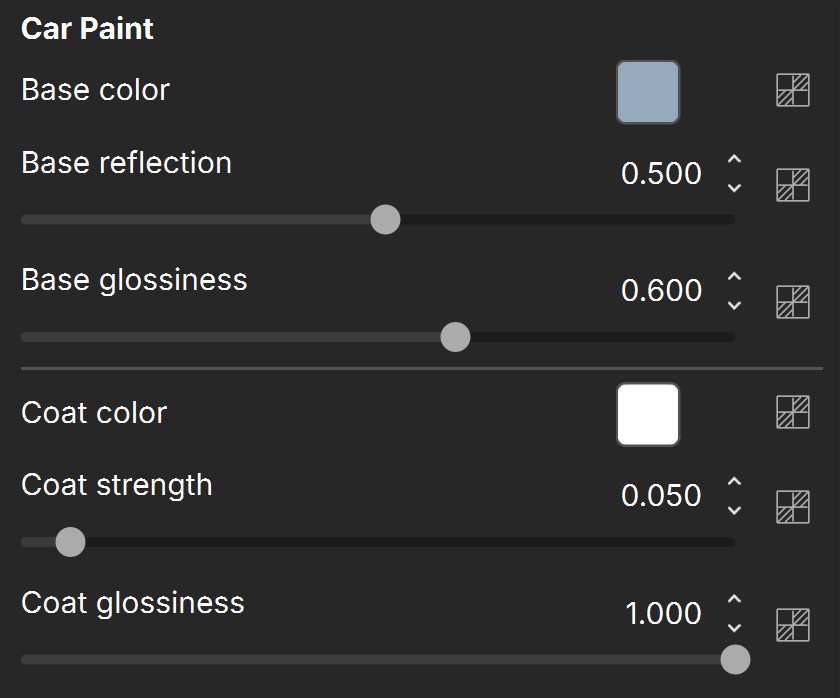
Base color – Specifies the diffuse color or map for the base layer. See the Base color example below.
Base reflection – Specifies a reflectivity value or map for the base layer. The reflection color itself is the same as the Base color.
Base glossiness – Specifies a reflection glossiness value or map for the base layer.
Coat color – Specifies the color or map of the coat layer. See the Coat Strength example below.
Coat strength – Specifies the strength value or map of the coat reflections when the surface is viewed directly from the front. See the Coat Strength example below.
Coat glossiness – Specifies the glossiness value or map of the coat reflections.
Example
The following examples demonstrate the effect that individual CarPaint material parameters have on the scene. Click on any image to view it at a higher resolution.
Example: Base Color
This example shows the effect of the Base color parameter.

Base color is white
RGB (0.95, 0.95, 0.95)

Base color is blue
RGB (0.3, 0.4, 0.5)

Base color is red
RGB (0.4, 0.1, 0.3)
Example: Coat Strength
This example shows the effect of the Coat strength parameter. The Base color is yellow - RGB (0.535, 0.56, 0.75). The Coat color is white - RGB (1, 1, 1). The Base reflection is set to 0.85, the Base glossiness is set to 0.6, and the Coat glossiness is set to 1.

Coat strength = 0.1

Coat strength = 0.25

Coat strength = 0.5
Here, the Coat color is changed to red - RGB (1, 0, 0) and to green - RGB (0, 1, 0).

Coat strength = 0.5
Coat color is red

Coat strength = 0.5
Coat color is green