Corona for 3ds Max
Corona User Property Map
This page provides information about the Corona User Property Map.
Last updated 1 September 2026
This page provides information about the Corona User Property Map.
Overview
The Corona User Property Map lets you get a user-defined value from a specific object (for example an RGB color value), and then use it to control a property of a material or a texture assigned to that object.
Example uses:
- Create one material. Assign this single material to multiple objects. Change the color of specific objects based on the values specified in their object properties
- Create one material and control the brightness of specific objects based on their user properties
- Blend two materials using a mask. Then control how this mask is affecting various objects by controlling the opacity of that mask based on the user properties of specific objects
Properties
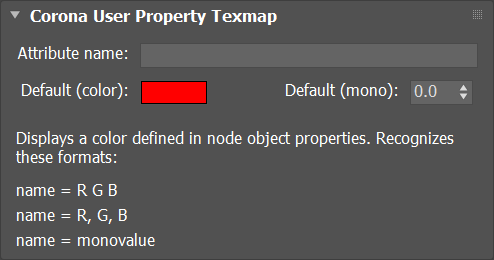
Attribute name – Specifies the name of the user property to display. It is case-sensitive.
Default (color) – Specifies default color value, substituted when no user property is found in an object.
Default (mono) – Specifies default monovalue, substituted when no user property is found in an object.