Corona for Cinema 4D
Scene Converter
This page provides information on the Scene Converter tool in Corona for Cinema 4D, its settings, and its usage.
Last updated 20 January 2026
This page provides information on the Scene Converter tool in Corona for Cinema 4D, its settings, and its usage.
Overview
The Scene Converter is a tool you can use to convert scenes made with other renderers to Corona. It automatically converts materials, shaders, lights, and more. It is installed with Corona by default and can be launched from the Corona menu.
Instructions on how to convert a scene are as follows:
- Open a previously created scene or import a model
- Open the Corona menu and click on the Convert Scene tool
- Decide if all available and supported elements are going to be converted or only part of them.
- Start the conversion process and wait for the result.
The Scene Converter tool is located in the Corona menu.
UI Path: ||Corona menu|| > Convert scene...

Options
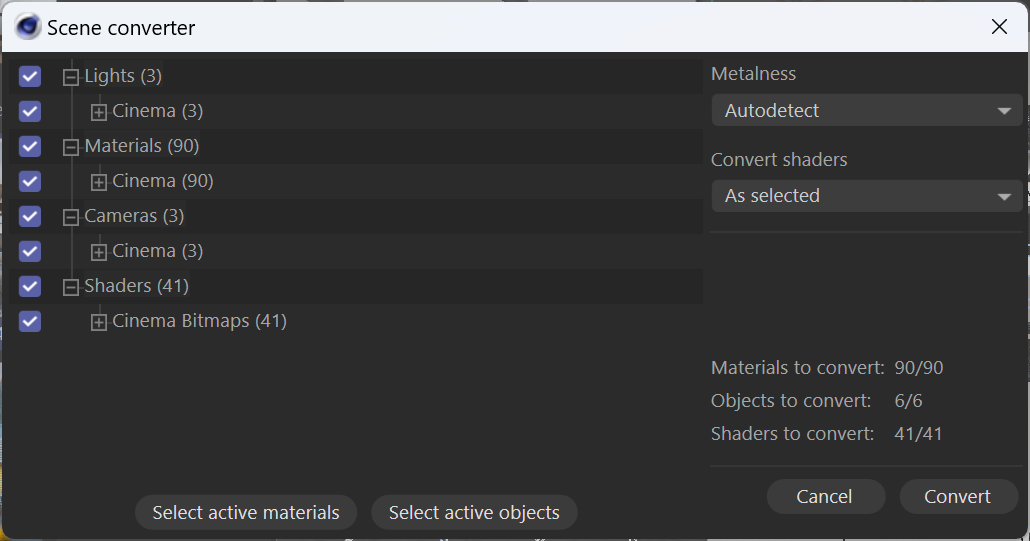
List – All available and supported elements are listed here when automatically detected in the scene project.
Select active materials – Using this button enables the checkboxes only for the listed materials available for conversion. The remaining elements available for conversion are disabled.
Select active objects – Using this button enables the checkboxes only for the listed objects available for conversion. The remaining elements available for conversion are disabled.
Metalness – This allows for choosing whether all the converted materials should be metals or non-metals or if the converter should decide automatically based on the material's reflectance parameters before conversion. Available modes are:
- Autodetect – Corona attempts to automatically detect whether a material should be converted to a metal or non-metal. This may not always be accurate, so some manual adjustments may be needed after the conversion.
- No metal – This mode sets the Metalness mode to Non-metal for all the converted materials.
- All metal – This conversion mode sets the Metalness mode to Metal for all the converted materials.
Convert shaders – This allows for selecting between different conversion methods to use for the shaders.
Cancel – Cancels the elements conversion.
Convert – Starts the conversion of the selected available supported elements.
Supported and Unsupported Items
Materials
Category | Original | Result |
|---|
Category | Original | Result |
|---|---|---|
Does not convert. | ||
Does not convert. | ||
Does not convert. | ||
Does not convert. | ||
Does not convert. | ||
Does not convert. | ||
Does not convert. | ||
Does not convert. | ||
Does not convert. | ||
Does not convert. | ||
Does not convert. | ||
Does not convert. | ||
Does not convert. | ||
Does not convert. | ||
Does not convert. | ||
Does not convert. | ||
Does not convert. | ||
Does not convert. | ||
Does not convert. | ||
Does not convert. | ||
Does not convert. |
Shaders
Category | Original | Result |
|---|
Category | Original | Result |
|---|---|---|
Does not convert. | ||
Does not convert. | ||
Does not convert. | ||
Does not convert. | ||
Does not convert. | ||
Does not convert. | ||
Does not convert. | ||
Does not convert. | ||
Do not convert, but can be rendered using Corona. | ||
Do not convert, but can be rendered using Corona. | ||
Does not convert. | ||
Do not convert, but can be rendered using Corona. | ||
Does not convert. | ||
Does not convert. | ||
Does not convert. | ||
Do not convert, but can be rendered using Corona. | ||
Does not convert. | ||
Do not convert, but can be rendered using Corona (Use the self-illumination channel from a Corona Physical Material or a Corona Light Material). | ||
Do not convert, but can be rendered using Corona (Use the self-illumination channel from a Corona Physical Material or a Corona Light Material). | ||
Does not convert. | ||
Do not convert, but can be rendered using Corona. | ||
Does not convert. | ||
Does not convert. | ||
Does not convert. | ||
Do not convert, but can be rendered using Corona. | ||
Does not convert. | ||
Do not convert, but can be rendered using Corona. | ||
Do not convert, but can be rendered using Corona. | ||
Do not convert, but can be rendered using Corona. | ||
Do not convert, but can be rendered using Corona. | ||
Do not convert, but can be rendered using Corona. | ||
Do not convert, but can be rendered using Corona. | ||
Do not convert, but can be rendered using Corona. | ||
Do not convert, but can be rendered using Corona. | ||
Do not convert, but can be rendered using Corona. |
Lights
Category | Original | Result |
|---|
Category | Original | Result |
|---|---|---|
Corona Sun and Corona Sky | ||
Does not convert. | ||
Does not convert. | ||
Does not convert. | ||
Does not convert. | ||
Do not convert, but can be rendered using Corona. | ||
Do not convert, but can be rendered using Corona. | ||
Does not convert. |
Other
Category | Original | Result |
|---|
Category | Original | Result |
|---|---|---|
Does not convert. | ||
Does not convert. | ||
Does not convert. | ||
Does not convert. | ||
Does not convert. | ||
Does not convert. | ||
Does not convert. | ||
Does not convert. | ||
Does not convert. | ||
Does not convert. | ||
Does not convert. |