Enscape
Remove Pop-ups
This page provides information on how to remove pop-ups.
Last updated 1 September 2026
This page provides information on how to remove pop-ups.
Windows
Enscape has the following pop-ups on Windows OS:
- The First Steps window that shows on the first start of Enscape.
- The Update notification pop-up appears when a new Enscape version is available.
- The Suppress Critical Graphics Driver Warnings pop-up appears when your graphics processing unit’s (GPU) driver is outdated.

These can be disabled from the Enscape General Settings window > Preferences.
These options can also be disabled when deploying Enscape to multiple machines across a network. For information on how to disable pop-ups when deploying Enscape to multiple machines across a network, see the Deploy to Multiple Machines article.
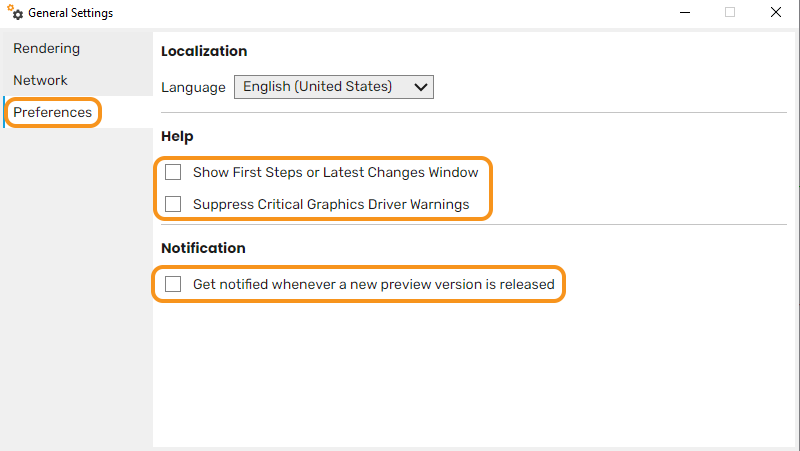
Disable the Update notifications option in the General Settings window
macOS
Enscape has the following pop-ups on macOS:
- The First Steps window that shows on the first start of Enscape
- The Suppress Critical Graphics Driver Warnings pop-up appears when your graphics processing unit’s (GPU) driver is outdated
- The Update notification pop-up appears when a new Enscape version is available
These can be disabled from the Enscape General Settings window > Preferences.
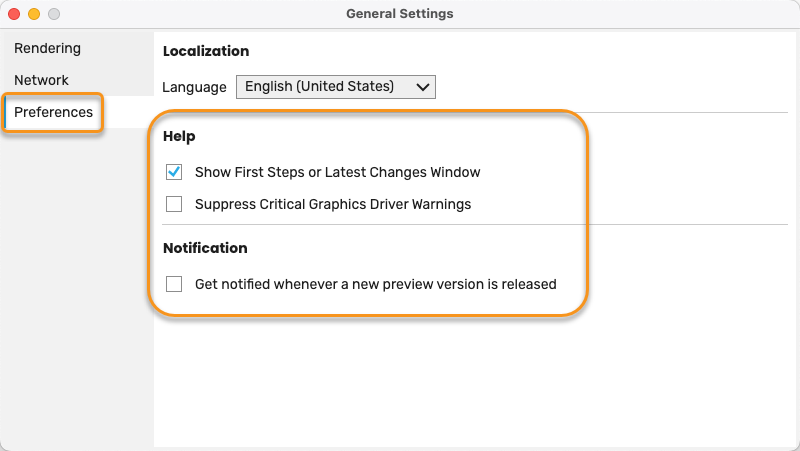
Notifications in the General Settings > Preferences