V-Ray for Maya
Shadow
This page gives some basic details about the Shadow Render Element and how it is used in compositing.
Last updated 18 September 2025
This page gives some basic details about the Shadow Render Element and how it is used in compositing.
Overview
The Shadow Render Element is a color image that works as a reverse mask for shadows and can be used to lighten, darken or tint shadows. Shadows can be lightened in the composite by adding this pass, or darkened by subtracting this render pass from the final composite.
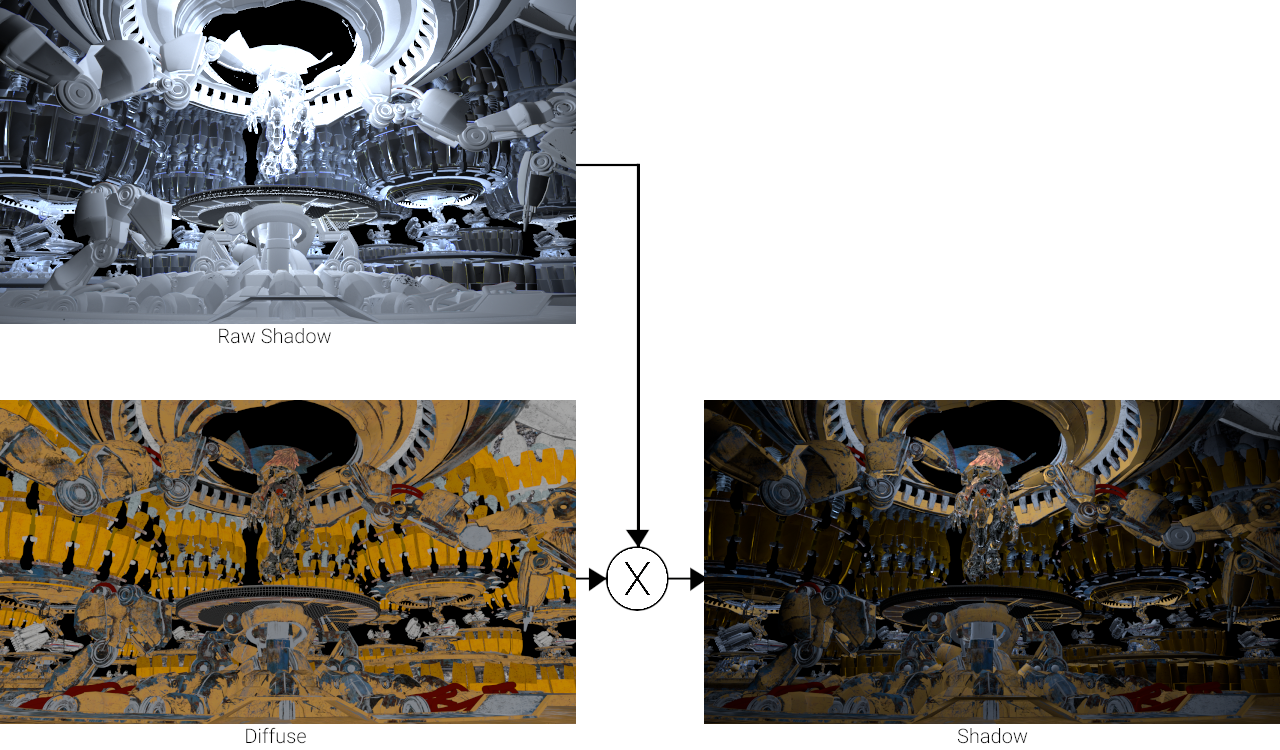
The VRayShadows render element is the product of multiplying the vrayRE_Raw_Shadow Render Element with the vrayRE_Diffuse Render Element in the composite.
UI Path: ||Display Render Settings button|| > Render Elements tab > Shadow


Attributes
Enabled – When enabled, the render element appears in the V-Ray Virtual Frame Buffer.
Deep output – Specifies whether to include this render element in deep images.
Filename suffix – The text added to the end of the rendered file, when saved as a separate file (e.g. myrender.shadow.vrimg).
Apply color mapping – Applies the color mapping options specified in the Color Management rollout of the VRay tab in the Render Settings window to this render element. This option is enabled by default.
Denoise – Enables the render element's denoising, provided the Denoiser render element is present.

Common Uses
The Shadow Render Element is useful for changing the appearance of shadowed areas in a compositing or image editing application. Below are examples of possible uses.

Shadow Render Element

Original Beauty Composite

Contrast added to the Shadows Render Element
Underlying Compositing Equation
vrayRE_Raw_Shadow x vrayRE_Diffuse = vrayRE_Shadow
Notes
- The vrayRE_Shadow pass can be both added and subtracted with the final beauty comp at a composite level without rerendering.
- Shadows can be color-corrected using the vrayRE_Shadow element.
- When rendering with V-Ray GPU CUDA, the Shadow Render Element is incompatible with Adaptive Lights and may render incorrectly if used together.