Skip to content
07-848 2005

V-Ray for SketchUp, Render Elements

Caustics

Learn how the Caustics render element works in V-Ray for SketchUp and how to use it when compositing.

On this page
  1. Overview
  2. UI paths
  3. Parameters
  4. Common uses
  5. Compositing

Use the Caustics render element in V-Ray for SketchUp to adjust caustic light patterns after rendering.

Overview

Caustics are visible light patterns created when materials reflect or refract light rays. This render element stores the effect generated by Caustics photon mapping.

Caustics render element isolates light patterns on the tabletop, with the glassware appearing black.
Beauty render shows a glass tumbler, decanter and stopper with caustic light patterns on a table.

UI paths

||V-Ray Asset Editor|| > Render Elements (right-click) > Caustics
||V-Ray Asset Editor|| > Create Asset (left-click) > Render Elements > Caustics

Parameters

Denoise controls whether this render element is denoised.

Parameters panel shows the Denoise checkbox unticked.

Common uses

Use the Caustics render element to change the appearance of caustics in a compositing or image editing application after rendering.


Beauty render shows glassware on a table with subdued caustic light patterns.
Beauty render shows glassware on a table with brighter caustic light patterns.

Compositing

Add the Caustics render element to the Beauty composite to create the final image.
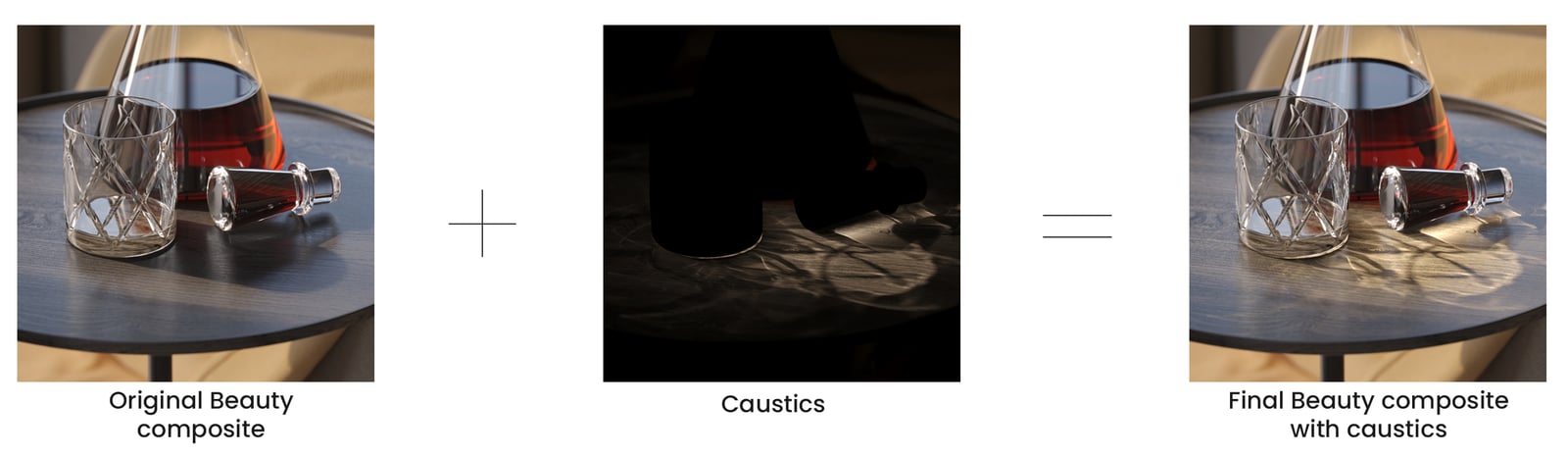
Compositing diagram shows Original Beauty composite plus Caustics producing the Final Beauty composite with caustics.
Adapted from Chaos documentation: Caustics. © 2026 Chaos Software EOOD

Procadsys customer support

Still need help?

Licences, renewals and billing

Our New Zealand team looks after your V-Ray licences, renewals and invoices.

Monday to Friday, 9:00 am to 4:30 pm NZ time, excluding New Zealand public holidays.

Technical problems

Installation errors, crashes and other technical problems with V-Ray are handled by Chaos support.