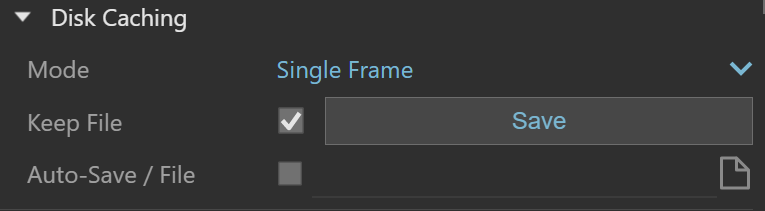
Use the Irradiance Map settings to control global illumination in V-Ray for SketchUp.
Overview
The Irradiance Map engine calculates global illumination by creating a map of points in 3d space. It stores the calculated indirect illumination at each point. Use these settings to adjust how V-Ray creates and uses the irradiance map.
These settings are available only when you select Irradiance Map as the Primary Rays GI engine in Global Illumination Settings.
Use the Irradiance Map Viewer included with V-Ray to view and edit irradiance map files.
UI path
||V-Ray Asset Editor|| > Settings > Global Illumination > Irradiance Map
Available when Irradiance Map is set as the Primary Rays engine.
Parameters
Min Rate sets the resolution of the first GI pass. A value of 0 uses the final rendered image resolution, making the irradiance map similar to direct computation. A value of -1 uses half the final image resolution, and lower values reduce it further. Usually, keep this value negative so GI calculates quickly for large, flat areas. This setting is similar to, but differs from, the Min rate parameter of the Adaptive subdivision image sampler.
Max Rate sets the resolution of the last GI pass. This setting is similar to, but differs from, the Max rate parameter of the Adaptive subdivision image sampler.
Subdivs controls the quality of individual GI samples. Lower values calculate faster but may produce blotches. Higher values produce smoother images. This setting is similar to the Subdivs parameter for direct computation. The value is not the number of rays traced. The number of rays is proportional to the square of this value.
Interpolation sets how many GI samples V-Ray uses to interpolate indirect illumination at a point. Higher values produce smoother results but tend to blur GI detail. Lower values preserve more detail but may produce blotches when Hemispheric Subdivs is low. When you use interpolated irradiance maps with Mode set to Animation (rendering), V-Ray multiplies this value by the number of irradiance maps used. For example, with Interpolative Samples set to 20 and Interpolation frames set to 2, V-Ray uses 100 samples to interpolate. This preserves the GI blurring of a single frame irradiance map but slows rendering. To speed up rendering in this case, reduce the value to 10 or 5.
Use Camera Path calculates GI samples for the entire camera path instead of only the current view. This option is available only when the project has an animation set up.
Color Threshold controls how sensitive the irradiance map algorithm is to changes in indirect lighting. Higher values reduce sensitivity. Lower values increase sensitivity to lighting changes and produce higher quality images.
Normal Threshold controls how sensitive the irradiance map is to changes in surface normals and small surface details. Higher values reduce sensitivity. Lower values increase sensitivity to surface curvature and small details.
Distance Threshold controls how sensitive the irradiance map is to the distance between surfaces. A value of 0.0 makes it independent of object proximity. Higher values place more samples where objects are close together.
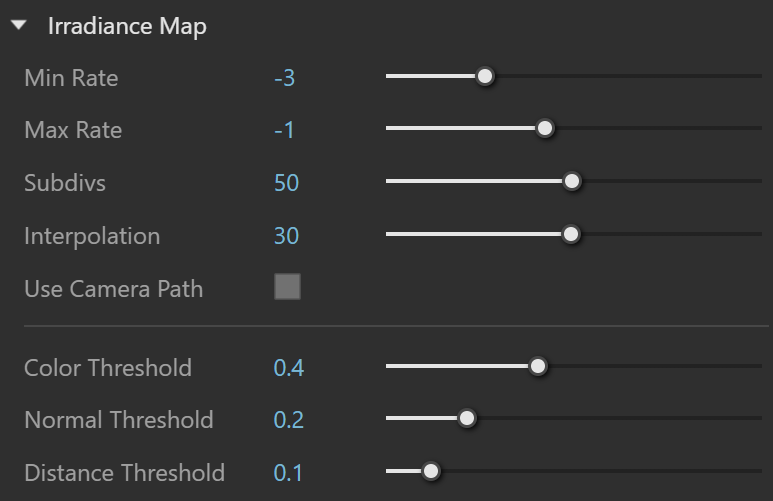
Disk caching
Mode sets how V-Ray uses or reuses the irradiance map:
Single Frame is the default mode. It calculates a new irradiance map for each animation frame.
From File loads an irradiance map from a file without calculating a new map.
Incremental Add to Map uses the irradiance map already in memory and refines only areas that lack detail. Use this mode to build a map for multiple views of a static scene or a fly-through animation.
Keep File keeps the last calculated irradiance map in memory after rendering finishes. Disabling this option automatically deletes the map from memory to free up memory.
Save stores the irradiance map currently in memory for later reuse.
Auto-Save / File automatically saves the irradiance map to the specified file when rendering finishes. Use this option when sending the irradiance map to another computer for network rendering.