V-Ray for SketchUp
Animation
This page provides information on the render settings for animations in V-Ray for SketchUp.
Last updated 1 September 2026
This page provides information on the render settings for animations in V-Ray for SketchUp.
Overview
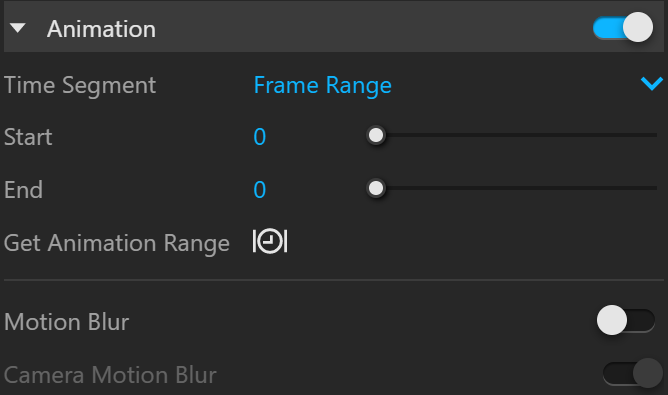
From the Animation rollout you can set a frame range for animated scenes. If no animation has been set up in SketchUp, the toggle of this section remains grayed out indicating that there is nothing animated in the current scene. You can also apply Motion Blur here.
There is no SketchUp native support for object animation. Nevertheless, V-Ray can render object animations in SketchUp scenes when they are introduced via animated proxies (.vrscene, .vrmesh or .abc files).

UI Path
||V-Ray Asset Editor|| > Settings > Animation
Parameters
Animation – Enables the rendering of animated sequences.
Time Segment – Specifies whether the entire animation or only a subset are rendered as individual frames.
Entire Animation – Renders the entire animation as individual frames.
Frame Range – Allows selection of only certain frames to be rendered.
Start – Allows to render a subset of the animation as opposed to render the entire sequence. Value is expressed in "frames".
End – Allows to render a subset of the animation as opposed to render the entire sequence. Value is expressed in "frames".
Get Animation Range – Sets the frame-range to match the current project animation length.
Motion Blur – Turns on motion blur sampling.
Camera Motion Blur – When enabled, it considers the camera movement when calculating the motion blur effect. Otherwise, only objects in motion are blurred. Note that only proxy scene or mesh references can introduce object animation.
Notes
- Always-facing-camera components are automatically supported when rendering an animation in V-Ray. Their position adjusts for each frame based on the camera location.