Skip to content
07-848 2005

V-Ray for SketchUp, Render Elements

Subsurface Scattering render element

Use the Subsurface Scattering render element in V-Ray for SketchUp to adjust the appearance of subsurface scattering after rendering.

On this page
  1. Overview
  2. UI paths
  3. Parameters
  4. Common uses
  5. Compositing

Use the Subsurface Scattering render element in V-Ray for SketchUp to adjust the appearance of subsurface scattering after rendering.

Overview

This render element stores light scattered by Subsurface Scattering materials.

Subsurface Scattering render element showing scattered light in candle wax against a black background.
Rendered scene with yellow wax candles showing subsurface scattering, including one lit candle.

UI paths

||V-Ray Asset Editor|| > Render Elements (right-click) > Subsurface Scattering
||V-Ray Asset Editor|| > Create Asset (left-click) > Render Elements > Subsurface Scattering

Parameters

Denoise controls whether this render element is denoised.

Parameters panel with the Denoise checkbox unticked.

Common uses

Use the Subsurface Scattering Render Element to change the appearance of SSS elements after rendering in compositing or image editing software. The example uses the SSS RE to change the scattering colour to red. Compare the render before and after compositing.

Rendered scene with yellow wax candles showing subsurface scattering, including one lit candle.
Composited render with the candles' scattering colour changed to red.

Compositing

Add the Subsurface Scattering Render Element to the Beauty composite to form the final image.
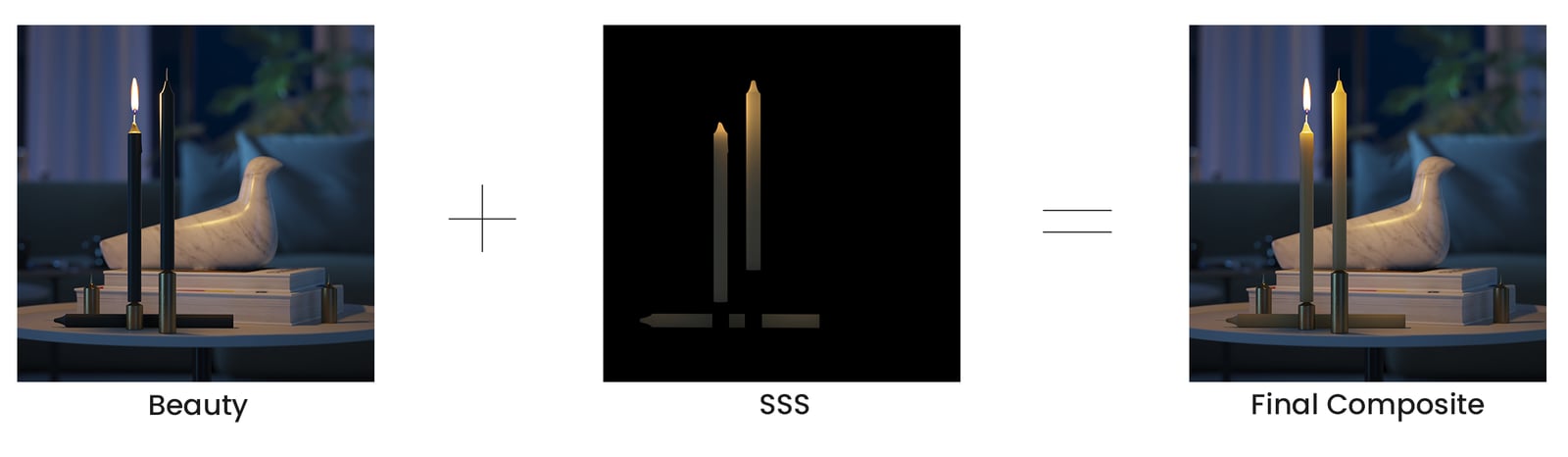
Compositing diagram showing Beauty plus SSS equals Final Composite, restoring scattered light in the candles.

Procadsys customer support

Still need help?

Licences, renewals and billing

Our New Zealand team looks after your V-Ray licences, renewals and invoices.

Monday to Friday, 9:00 am to 4:30 pm NZ time, excluding New Zealand public holidays.

Technical problems

Installation errors, crashes and other technical problems with V-Ray are handled by Chaos support.