Use the V-Ray UVW Placement texture to control texture mapping and randomise texture placement.
Overview
The V-Ray UVW Placement texture provides a custom mapping source you can share between textures. Its randomisation parameters let you vary texture placement based on IDs, names and other values. Additional controls set the amount and behaviour of the randomisation.
UI paths
||V-Ray Asset Editor|| > Textures (right-click) > UVW Placement
||V-Ray Asset Editor|| > Create Asset (left-click) > Textures > UVW Placement
Alternatively, set the texture's Placement Type to Mapping Source. Click the UV Placement Source icon and select UVW Placement.

Placement parameters
Type controls how the texture is positioned on the geometry.
2D (UV Channel) uses the object's UV coordinates.
3D (Object Space) uses the object's local coordinates, independently of its UVs.
3D (World Space) uses world coordinates, independently of the object's UVs.
Environment applies when the map connects to an Environment slot or a Dome light.
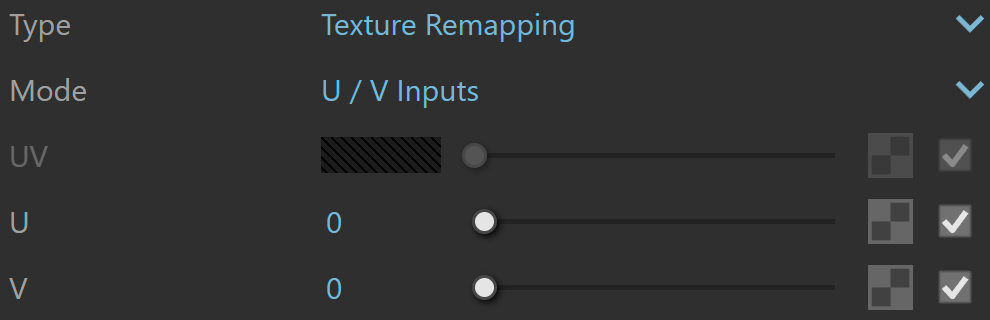
Texture Remapping uses UVW values from a colour texture or separate greyscale textures.
2D (UV Channel)
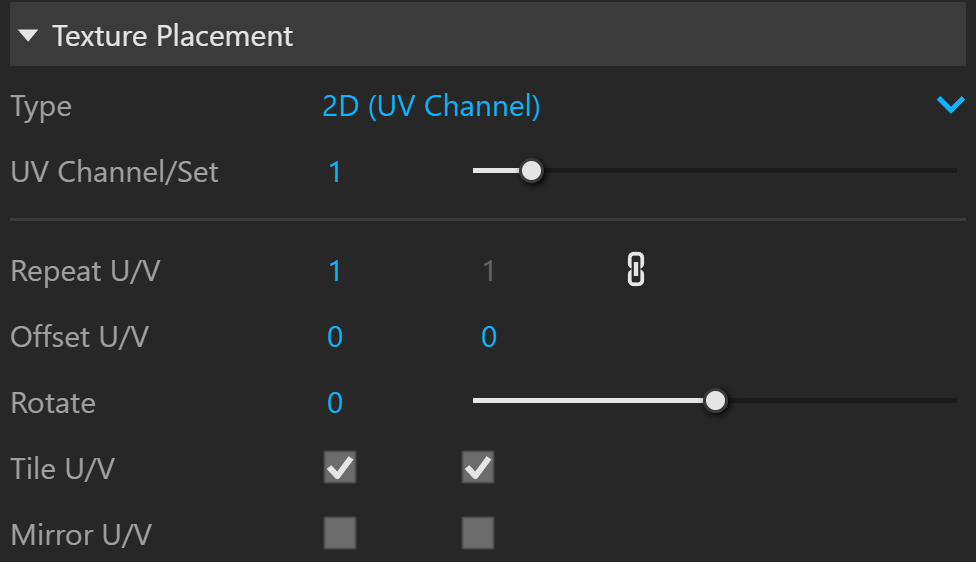
UV Channel/Set specifies the index of the mapping channel data to use. A value of 1 uses the first available channel.
Repeat U/V sets how many times the texture repeats within the 0 to 1 UV square.
Offset U/V controls the texture offset in the U and V directions.
Rotate rotates the texture in degrees.
Tile U/V tiles the texture in the U and V directions. When disabled, the Default texture colour appears outside the 0 to 1 UV square.
Mirror U/V mirrors the texture separately in the U and V directions. It cuts the texture in half and flips one side vertically or horizontally. Use it to avoid seams when repeating textures that do not tile.
3D (Object Space)
Repeat X/Y/Z sets how many times the texture repeats along the X/Y/Z axis.
Lock U/V Repeat locks the X/Y/Z repeat.
Offset X/Y/Z controls the texture offset in the X/Y/Z direction.
Rotate X/Y/Z rotates the texture around the X/Y/Z axis.
3D (World Space)
Repeat X/Y/Z sets how many times the texture repeats along the X/Y/Z axis.
Lock U/V Repeat locks the X/Y/Z repeat.
Offset X/Y/Z controls the texture offset in the X/Y/Z direction.
Rotate X/Y/Z rotates the texture around the X/Y/Z axis.
Environment
Mapping sets the texture type and shape.
Angular
Cubic
Spherical
Spherical Inverted
Mirror Ball
Screen
Rotate H rotates the environment sphere horizontally.
Flip H flips the environment sphere horizontally.
Rotate V rotates the environment sphere vertically.
Flip V flips the environment sphere vertically. It is available only in Spherical Mapping.
Ground enables ground projection of the texture.
Position X/Y/Z offsets the ground projection along the X/Y/Z axis.
Radius sets the projection radius. Use it to control the projection scale.
For 2d Transformation, see the 2D (UV channel) parameters.
Texture Remapping
Mode sets whether a single texture or multiple textures remap the U and V texture coordinates.
UV uses the input texture's Red channel to set the U sampling coordinate. The Green channel sets the V coordinate.
U uses this texture's value to set the U sampling coordinate.
V uses this texture's value to set the V sampling coordinate.
2D (UV Channel)

3D (Object Space)

3D (World Space)

Environment
Texture Remapping
Randomisation parameters
By Face ID uses the object's face IDs when passing colour or texture data to the material.
By Render ID assigns random colours based on RenderIDs.
By Node Handle generates a colour index from the node's unique number, or handle, assigned when the node is created. The handle stays the same during scene editing. Colours remain consistent when you add, remove or rename other objects.
By Mesh Element assigns random colours based on the object's element IDs.
By Instance assigns random colours based on InstanceID. It works with Alembic instances and VRayInstancer source objects.
By Object ID uses the object's Object IDs when passing colour or texture data to the material.
By Node Name generates a colour index from the name of the node the texture is applied to. The colour stays consistent when you merge the object into another scene or reference it using X-Ref.
Stochastic tiling changes the mapping based on the UV tile.
Tile Blend controls edge blending between adjacent tiles in Stochastic tiling mode.
Seed changes the randomisation pattern when you use one or more randomisation modes.
U Offset controls the range of variation in the U offset.
V Offset controls the range of variation in the V offset.
UV Rotation controls the range of variation in UV rotation, in degrees.
U Scale controls the range of variation in the U scale, as a percentage.
V Scale controls the range of variation in the V scale, as a percentage.
Random Flip U/V randomly flips the texture separately in the U or V direction.
Step sets the number of steps across the variation interval. For example, if UV Rotation runs from 0 to 360 with a Step of 5, the texture rotates in multiples of 72 degrees, such as 72, 144 and 216.

Example: Stochastic Tiling
Stochastic Tiling randomises the texture mapping in each tile to reduce visible repetition. This example shows how to use it to render a brick wall.
Use a Bricks Weathered material from the V-Ray Material Library. Open the texture linked in the Map slot of the Brick Weathered material's Diffuse Color. Set Placement Type to Mapping Source. Click the UV Placement Source icon and select UVW Placement.
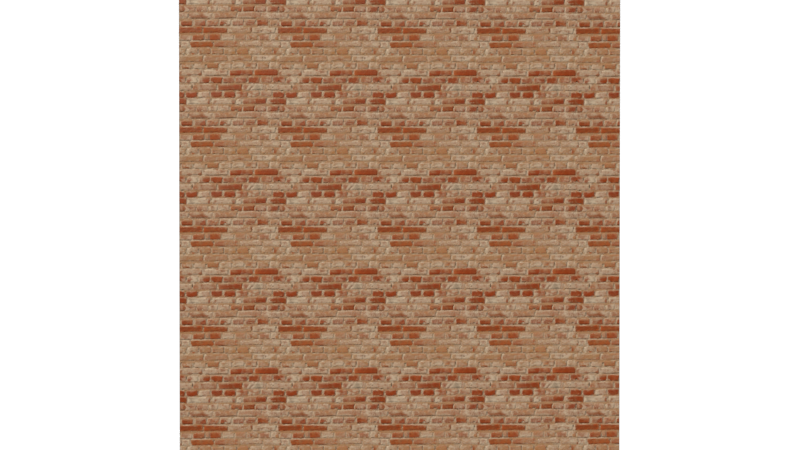
Brick walls usually have horizontal rows. Set UV Rotation to 0 to remove random rotation. Enable Stochastic Tiling in UVW Placement and set Tile Blend to 0.01. The default U and V offset intervals run from 0 to 1, allowing an offset of up to a full tile. Adjust the step value to fine-tune the randomisation. Choose offset Steps that align the brick rows in adjacent tiles. The rendered images below show the results with different steps.

U/V Offset = 1

U/V Offset = 3

U/V Offset = 5