Skip to content
07-848 2005

KeyShot Studio, User Interface

Backplates tab

Use the Backplates tab in KeyShot to find preset or saved backplates in your library.

The Backplates tab in KeyShot contains all preset or saved backplates in your library.
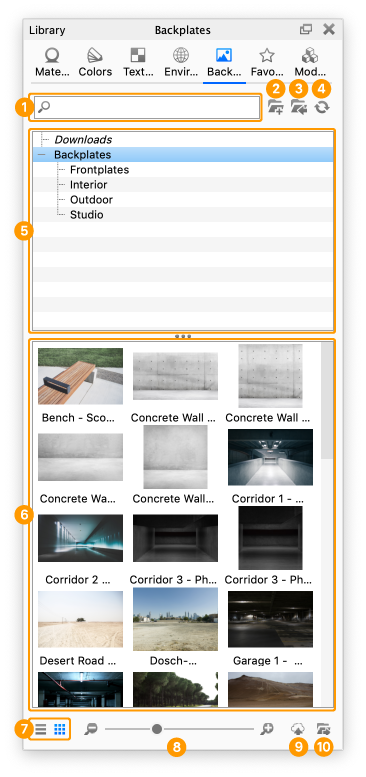
Library backplates
  1. Search
    Enter a keyword to search for a backplate by name.
  2. Add Folder
    Click to add custom backplate folders.
  3. Import
    Import an image file.
  4. Refresh
    Refresh the backplate list after making changes.
  5. Folder Tree
    Shows how your backplate folders are organised.
  6. Backplate Thumbnails
    Shows thumbnails of the backplates in the selected folder.
  7. List/Thumbnail Toggle
    Switch between thumbnail and list views of your backplates.
  8. Zoom Slider
    Drag the slider to change the thumbnail size. Use +/- to change the size in steps.
  9. Upload to Cloud Library
    Click to upload a custom backplate to the Cloud Library.
  10. Export
    Export an image file.
Adapted from KeyShot Studio documentation: Backplates tab. © 2026 KeyShot

Procadsys customer support

Still need help?

Licences, renewals and billing

Our New Zealand team looks after your KeyShot licences, renewals and invoices.

Monday to Friday, 9:00 am to 4:30 pm NZ time, excluding New Zealand public holidays.

Technical problems

Installation errors, crashes and other technical problems with KeyShot are handled by KeyShot support.