Use Walkthrough Mode to move around your KeyShot scene from a first-person view.
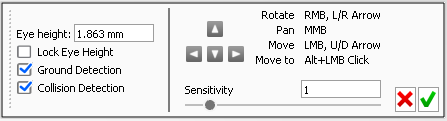
To enter Walkthrough Mode, go to Project Window > Camera tab > Position and Orientation. Select Walkthrough Mode. The Walkthrough Mode HUD appears, and a camera called First Person is added to the camera list.
Eye Height
Eye Height shows the camera's height relative to the lower object.
Lock Eye Height
Lock Eye Height keeps the camera at a constant height and ignores the Ground Detection setting described below.
Ground Detection
Ground Detection automatically adjusts the camera to maintain the Eye Height set above. As you move towards an object such as stairs, the camera follows the new ground level and appears to climb the stairs.
Collision Detection
Select Collision Detection to prevent movement through objects. This makes the walkthrough more realistic.
Arrows
Click and hold an arrow to move around your scene in that direction.
Sensitivity
Sensitivity controls how the movement controls respond in Walkthrough Mode. Move the slider or enter a value in the box.
Accept/cancel
- Click the X at the bottom right to cancel all changes and delete the camera from the list.
- Click the V at the bottom right to accept all changes and save the First Person camera.