Skip to content
07-848 2005

KeyShot Studio, cameras

Cameras

Use the Camera tab in KeyShot Studio to adjust camera settings, choose the active camera and save views of your scene. You can reuse, modify or animate saved cameras, or use them in Studios.

Use the Camera tab in KeyShot Studio to adjust settings for all camera views, choose the active camera and save views of your scene. You can reuse, modify or animate saved cameras, or use them in Studios.

You can adjust cameras much like a real camera, with options such as shift lenses, walkthrough mode and Depth of Field. KeyShot Studio Pro also includes panoramic lenses that produce cube or spherical maps for real-time VR rendering and output.

This section explains how to use each camera type and adjust its settings.
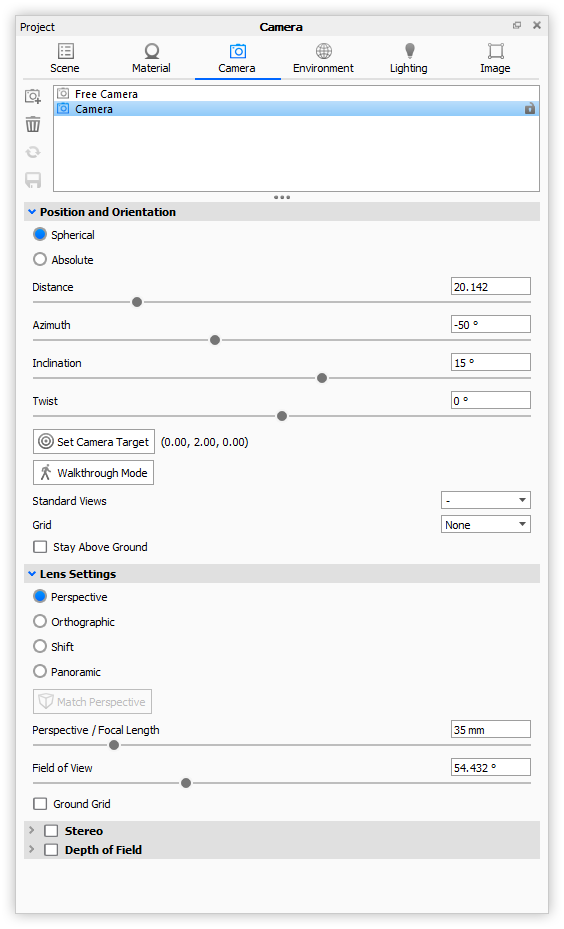
Camera panel with Position and Orientation controls, Lens Settings and Perspective selected.
Adapted from KeyShot Studio documentation: Cameras. © 2026 KeyShot

Procadsys customer support

Still need help?

Licences, renewals and billing

Our New Zealand team looks after your KeyShot licences, renewals and invoices.

Monday to Friday, 9:00 am to 4:30 pm NZ time, excluding New Zealand public holidays.

Technical problems

Installation errors, crashes and other technical problems with KeyShot are handled by KeyShot support.