KeyShot Studio
Weave
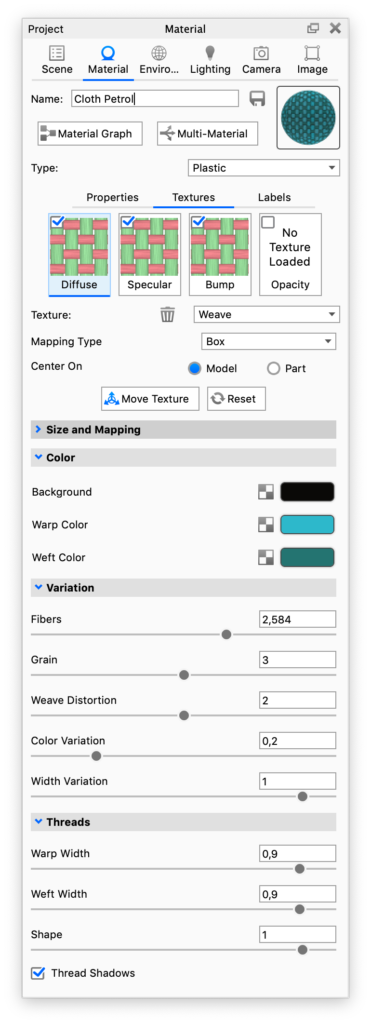
The Weave procedural texture can be used to simulate many types of fabrics and fine woven meshes.
Last updated 3 August 2026
The Weave procedural texture can be used to simulate many types of fabrics and fine woven meshes.
Color
Background Color
This sets the color of the gaps between the threads.
Warp Color
Sets the color of the vertical threads in the weave.
Weft Color
Sets the color of the horizontal threads in the weave.
Variation
Fibers
Adds a stroked effect to the threads that creates the appearance of fibers in the thread.
Grain
Adds grain to the threads.
Weave Distortion
Makes the threads uneven in thickness.
Color Variation
Adds variation to the intensity of the thread colors.
Width Variation
Makes some threads thinner and some thicker, giving the weave a more handcrafted look.
Threads
Warp Width
Adjust the width of the vertical threads in the weave
Weft Width
Adjust the width of the horizontal threads in the weave
Shape
with this slider you can adjust how flat/round the threads are. A value of 0 produces flat threads and 1 gives round threads. This setting is only relevant if the Thread Shadows are enabled
Thread Shadows
Enables the shadows that create the illusion of round threads.
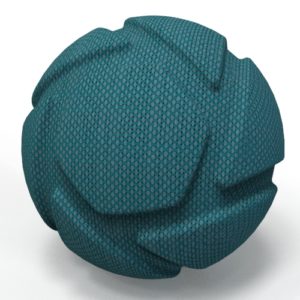
This material has been adapted from the “Cloth weave Beige 1mm” Library material. Here the texture has been applied as Diffuse, Specular and Bump maps.