KeyShot Studio
Brushed
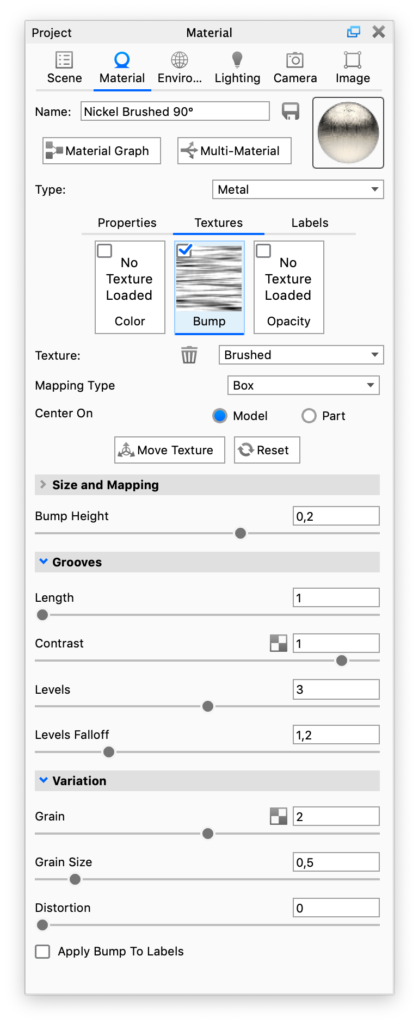
The Brushed procedural texture simulates the effects of brushed metal. It is best used as a bump on a metal material with a low roughness value.
Last updated 3 August 2026
The Brushed procedural texture simulates the effects of brushed metal. It is best used as a bump on a metal material with a low roughness value.
Size and Mapping
See the Move Texture page
- Bump Height Use this to set the depth of the brushed texture.
Grooves
- Length – Use this to control the length of the brush strokes.
- Contrast – Use this to control how defined the brush stokes are as a whole.
- Levels – controls the amount of brush strokes.
- Levels falloff – Use this to control how defined each brush stoke is.
Variation
- Grain – This slider controls the amount of grain that is added to the brushed texture.
- Grain size – Here you can control the size of the grain.
- Distortion – this slider will add distortion to the brush strokes.
- Apply Bump to Labels – When enabled the bump map will also be applied to any labels on the material.
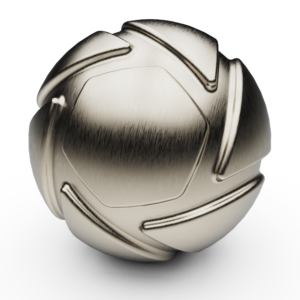
Here the Brushed texture is used to add texture to the Nickel Brushed 90° material, which is available in the Material Library.