Estimating building height
If you do not know a building's height, use one of these methods to estimate it for your SketchUp model:
- Count repeated units.
- Take a photo with an object of known height.
- Use trigonometry.
Before you extrude the building's footprint, switch to ISO view by choosing Camera > Standard Views > Iso. Use the Push/Pull tool ( ) to extrude the building into 3D, then enter the building's exact height.
Method 1: Count repeated units
Buildings often use repeated units such as bricks or blocks. Measure the height of a single unit, count the units up the facade, then multiply the height by the count to estimate the building's height.
You can also use building levels as repeated units. Measure the height of a single level on the facade, then multiply it by the total number of levels to estimate the building's height.
Method 2: Take a photo with an object of known height
When you photograph the building, include an object or person whose height you know.
- Use a metre stick or a person of known height.
- Position the object or person as close to the building as possible for accuracy.
- Take the photo from as far away as possible to minimise vertical distortion.
Use a photo-editing program to compare the building with the object or person in the photo and estimate its height.
Method 3: Use trigonometry
You can estimate the building's height using the measurements shown in the figure below. You need:
- Your distance from the building.
- Your eye height.
- The angle between the ground and the top of the building.
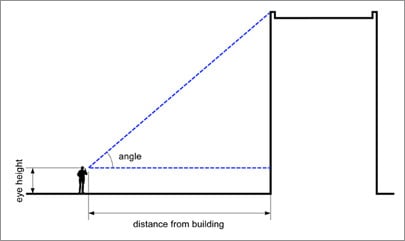
Use this formula to calculate the building's height:
Height = ( tan(angle) x distance ) + eye height
For example, if your distance from the building is 25 metres, the angle is 37 degrees and your eye height is 1.75 metres, the calculation is:
Height = tan(37) x 25m + 1.75m
= 0.75355 x 25m + 1.75m
= 20.6m