Dialog Boxes and Trays
Dialog Boxes and TraysSketchup organizes available features into modeless dialog boxes. Modeless dialog boxes help keep many SketchUp features, like Materials and Styles, easy to access while modeling.In MacOS, dialog boxes appear as independent windows that can be moved around the modeling window as needed.
Last updated 17 July 2026
Dialog Boxes and Trays
Sketchup organizes available features into modeless dialog boxes. Modeless dialog boxes help keep many SketchUp features, like Materials and Styles, easy to access while modeling.
In MacOS, dialog boxes appear as independent windows that can be moved around the modeling window as needed.
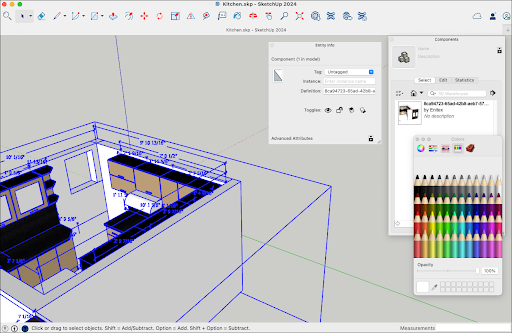
Available Dialog Boxes
The following dialog boxes are available:
- Entity Info
- Materials
- Components
- Styles
- Tags
- Scenes
- Shadows
- Fog
- Match Photo
- Soften Edges
- Overlays
- Instructor
- Outliner
Still need help?
Technical support from our New Zealand team is available to customers with a current Procadsys SketchUp Plus subscription: Pro Plus, Pro Scan Plus, Pro Civil Contractor Plus, Advanced Workflows Plus or Studio Plus. Self-help articles are public.
Contact SketchUp support