V-Ray for 3ds Max
Camera Clipping Rollout
The Camera Clipping rollout is part of the Chaos Scatter parameters.
Last updated 21 May 2026
The Camera Clipping rollout is part of the Chaos Scatter parameters.
Parameters
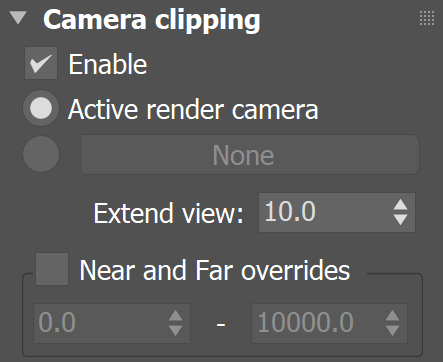
Enable – When enabled, instances are limited to a camera view. The rest are clipped away. This option may improve scene parsing performance and lower memory requirements. It is disabled by default.
Active render camera – This mode uses the camera from the current viewport to clip instances. If the parameters are left at default, the clipping will not be visible in the viewport, allowing editing while the instances are optimized at the same time. With a reasonable Extend view value, this mode is recommended for optimizing your scene. It works automatically, so it automatically saves scene parsing time and RAM usage.
Specific scene camera – This field below allows you to select a camera from the scene to use for clipping. In this case the clipping is always visible in the viewport.
Extend view – Specifies an extension to the camera view in all directions. All instances inside the Extend view are not clipped.
Near and Far overrides – Specifies the near - and far threshold distances from the camera. The near threshold value determines the minimum distance from the camera, before which instances are clipped. The far threshold distance determines the maximum distance away from the camera, after which instances are clipped. This option gives extra control over the clipping. It is disabled by default.