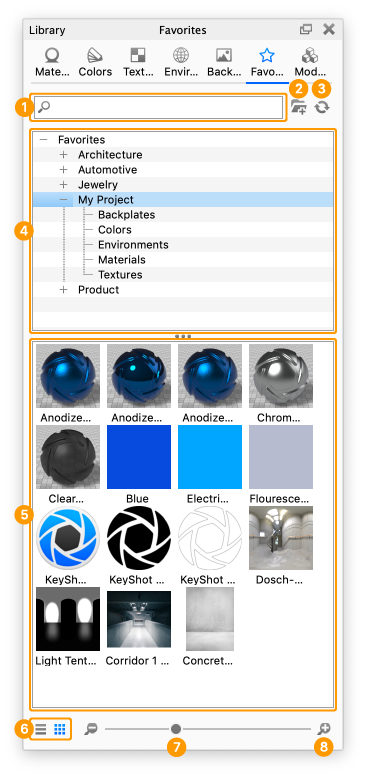
Use the Favorites tab in KeyShot to organise resources you use often into collections.
Search Enter a keyword to find a resource by name.
Add Favorite Group Click this button to add a favourites folder.
Refresh Refresh the favourites list after making changes.
Folder Tree Shows how your favourites folders are organised. Each folder contains categories for backplates, colours, environments, materials, models and textures.
Favorites Thumbnails Shows thumbnails of the resources in the selected folder.
List/Thumbnail Toggle Switch between thumbnail and list views of your favourites.
Zoom Slider Drag the slider to change the thumbnail size. Use +/- to change the size in steps.
Add a resource to your Favorites
Right-click a resource in your library and select Add to Favorite. Select a folder for the resource, or select Add to new Favorite to create a collection.