Skip to content
07-848 2005

KeyShot Studio, User Interface

Lighting tab

Use the Lighting tab to control global lighting settings for your KeyShot scene. Set up light sources with Lighting Environments and Light Source materials.

Use the Lighting tab to control global lighting settings for your scene. Set up light sources with Lighting Environments and Light Source materials.
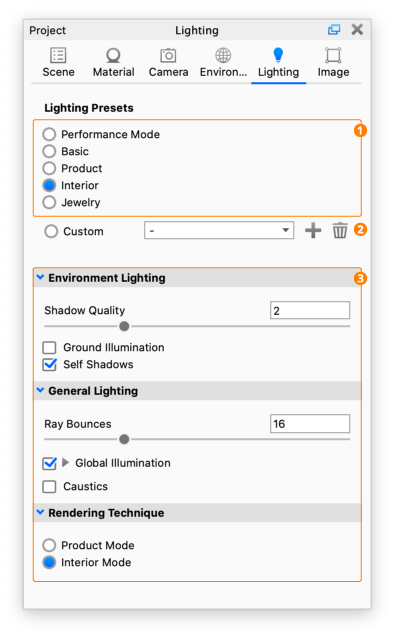
Project lighting overview

1. Lighting Presets

KeyShot Studio includes 5 Lighting Presets for applying global lighting settings. The Lighting section describes each preset.

2. Custom

Save your lighting setup as a custom preset to reuse it in other scenes.

Select the Add icon icon and name the preset. It appears in the Custom Presets list. To delete a custom preset, select it in the list and select the Trash icon trash icon.

3. Environmental Lighting

Use these options to control your lighting settings. The Custom Lighting Presets page explains each setting.

Adapted from KeyShot Studio documentation: Lighting tab. © 2026 KeyShot

Procadsys customer support

Still need help?

Licences, renewals and billing

Our New Zealand team looks after your KeyShot licences, renewals and invoices.

Monday to Friday, 9:00 am to 4:30 pm NZ time, excluding New Zealand public holidays.

Technical problems

Installation errors, crashes and other technical problems with KeyShot are handled by KeyShot support.