Skip to content
07-848 2005

KeyShot Studio, materials

Random Texture

Use the Random Texture node to vary textures on your parts for a more natural appearance. Connect multiple different texture maps to the node, then connect it to a part.
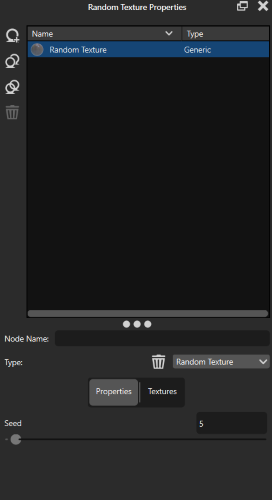
Use the Random Texture node to vary textures on your parts for a more natural appearance. Connect multiple different texture maps to the node, then connect it to a part.

RandomTexture Node

Random Texture example

This scene uses randomised wood textures. One Random Texture Node randomises the Color. The other randomises the roughness.
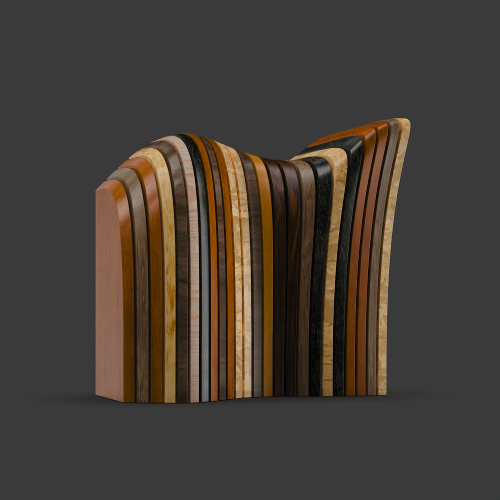
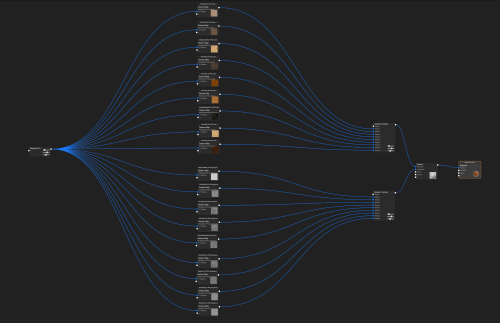
RandomBlock RandomTexture.11
RandomTexture MaterialGraph
Adapted from KeyShot Studio documentation: Random Texture. © 2026 KeyShot

Procadsys customer support

Still need help?

Licences, renewals and billing

Our New Zealand team looks after your KeyShot licences, renewals and invoices.

Monday to Friday, 9:00 am to 4:30 pm NZ time, excluding New Zealand public holidays.

Technical problems

Installation errors, crashes and other technical problems with KeyShot are handled by KeyShot support.