A Tri-Planar texture is a type of Image Map. Find its settings in the Project Window > Materials > Textures tab.
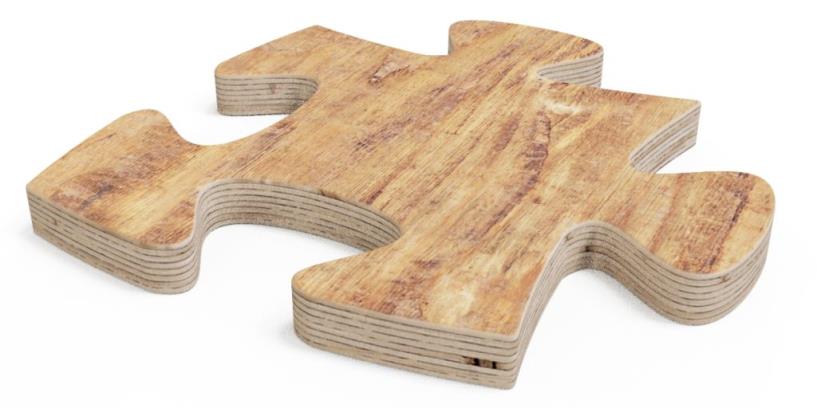
Use Tri-Planar to apply different textures to the 3 planes of an object. This is useful for materials such as plywood.
Tri-Planar only supports box mapping. It projects a different texture onto each of the X Y Z planes.
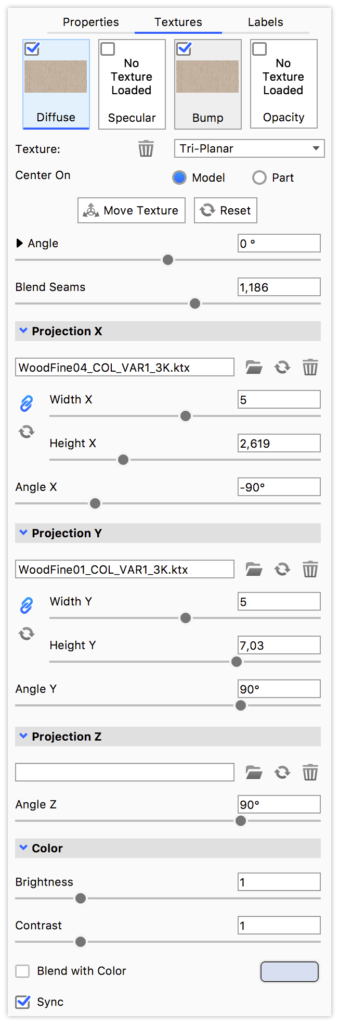
Move Texture Angle Blend Seams Projection X Y Z File Size Angle |
 Lock Aspect keeps the texture's scale uniform, and
 reset restores the original aspect ratio.
Color
Brightness
Adjust the brightness of all 3 textures.
Contrast
Adjust the contrast of all 3 textures.
Blend with color
Add a colour blend to all 3 textures.
Sync
Select sync to keep this texture synchronised with the other textures on this material.