Skip to content
07-848 2005

KeyShot Studio, materials

Wireframe

Adjust the wires and base colours of a Wireframe material in KeyShot.

On this page
  1. Base Color
  2. Base Transmission Color
  3. Backside Base Color
  4. Backside Wire Color
Wireframe material

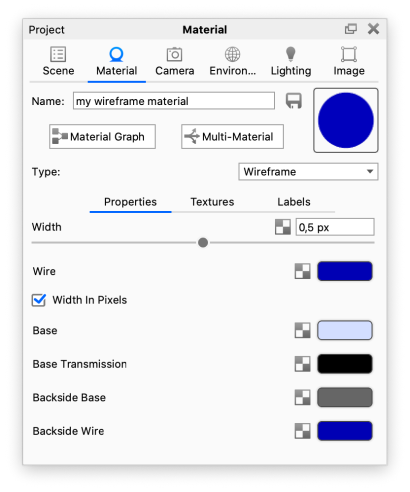
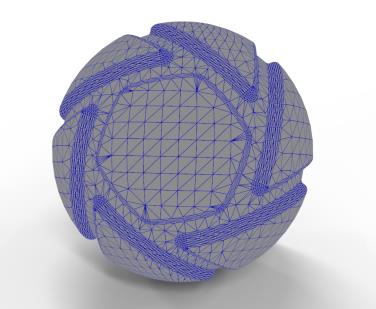
The Wireframe material shows the lines and vertices of each polygon on a surface.

Wireframe material

Width

Controls the width of the wireframe lines (wires).

Width in Pixels

When enabled, wire widths use pixels. When disabled, wire widths use scene units.

Wire Color

Controls the colour of the wireframe lines.

Base Color

Controls the material's overall colour, excluding the wires.

Base Transmission Color

Controls the base transmission colour. A lighter colour gives the appearance of transparency.

Backside Base Color

Controls the base colour on the back of the surface. On a cube, this is the inside.

Backside Wire Color

Controls the wire colour on the back of the surface.

Adapted from KeyShot Studio documentation: Wireframe. © 2026 KeyShot

Procadsys customer support

Still need help?

Licences, renewals and billing

Our New Zealand team looks after your KeyShot licences, renewals and invoices.

Monday to Friday, 9:00 am to 4:30 pm NZ time, excluding New Zealand public holidays.

Technical problems

Installation errors, crashes and other technical problems with KeyShot are handled by KeyShot support.