Use the Wood (Advanced) procedural texture in KeyShot for finer control of wood rings, knots and grain than the basic wood procedural texture.
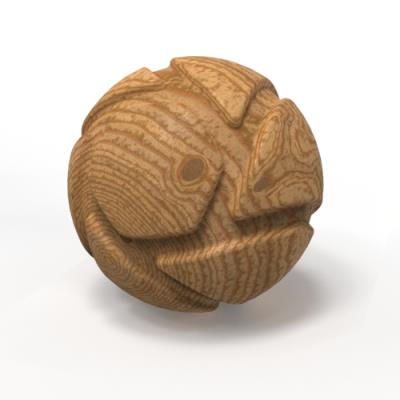
This example uses the Wood (advanced) texture as both a diffuse map and a bump map. The material is Oak wood satin from the KeyShot Studio library. Only the size of the rings and knots has been adjusted to match the model.
Scale
Adjust the overall scale of the texture map.
Angle
See the angle description on the Move Texture page.
Winter/Spring/Summer/Fall
Wood formed during spring and summer is light in colour. Towards the end of the growing season, new cells are smaller and have darker, thicker walls. Select the colour swatches to colour the rings for each season.
Ring Width
Adjust the thickness of the wood rings.
Ring Width Variation
Add variation to the width of the wood rings.
Variation
Ring Spacing Variation
Control the contrast between thick and thin ring shapes to represent different rates of annual growth.
Ring Noise
Add fluctuations or waviness to the rings.
Axial Noise
Increase this value to vary the circular shapes of the rings.
Color Noise
Increase this value to add more splotches of colour to the rings.
Seasonal Color Noise
Add variation to each colour swatch as the colours blend.
Knots
Knot Color/Border
The knot colour blends into the main texture colours. Choose a grey value to darken the knots. Keep the knot border darker than all the other colours.
Knot Density
Control how many knots appear in the texture.
Knot Age
Increase this value to increase the number of rings in the knots.
Knot Border Size
Adjust the thickness of the knot borders.
Knot Distortion
Control fluctuations and add irregularities to the knot shapes.
Branch Scale
Control the overall size of the knots.
Grain
Grain Color Bleed
Control how much colour each ring blends into the rings on either side. Decrease this value for clearly defined rings. Increase it for a more blended appearance.
Axial Graininess
Increase this value to blur the texture.
Ring Graininess
Adjust the thickness of the wood rings.
Grain Scale
Adjust the size of the grain striations between the rings.
Grain Thinness
Control the size of the grain striations.
Advanced
Seed
Scrub through this parameter to add randomness to all the previous parameters for a more natural appearance.