Adding or Disabling Multi-Factor Authentication
If you need to change your Multi-Factor Authentication (MFA) for any reason, you can do so from myprofile.trimble.com.Adding MFATo add another MFA option to your account, follow these steps:Under Multi-Factor Authentication click Set Up next to the option you want to add.
Last updated 17 July 2026
If you need to change your Multi-Factor Authentication (MFA) for any reason, you can do so from myprofile.trimble.com.
Adding MFA
To add another MFA option to your account, follow these steps:
- Under Multi-Factor Authentication click Set Up next to the option you want to add.
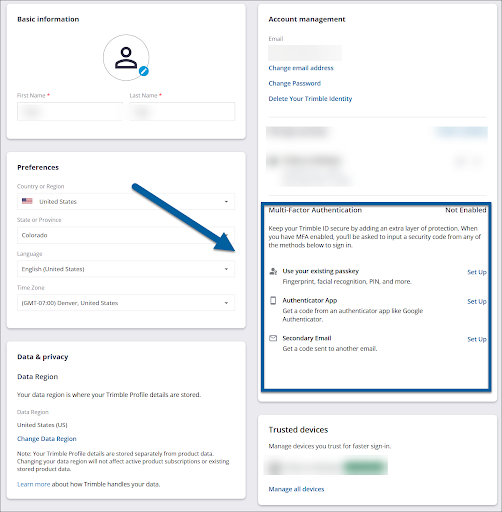
- Follow the prompts based on that authentication method.
- (Optional) When you sign in, click the context menu (
 ) and choose Make Default to make the new MFA method your default method.
Disabling MFA
All Trimble accounts require at least one MFA method. If you choose not to use a passkey, an authenticator app, or use a secondary email, you will still need to login using a one-time passcode sent to your email address. To disable any of the active MFA methods on your account, open your profile and follow these steps:
- Under Multi-Factor Authentication, click the toggle to the off position.
- When prompted, enter your password and select Submit .
- Enter the verification code sent to your preferred MFA method.
- Confirm you would like to disable MFA.
Still need help?
Technical support from our New Zealand team is available to customers with a current Procadsys SketchUp Plus subscription: Pro Plus, Pro Scan Plus, Pro Civil Contractor Plus, Advanced Workflows Plus or Studio Plus. Self-help articles are public.
Contact SketchUp support