Finding and Using Add Location
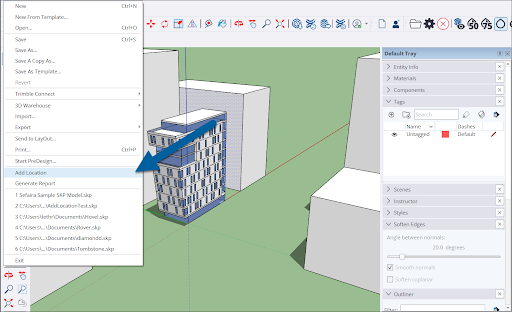
To get started with Add Location, select File > Add Location from the Menu bar.Another way to open Add Location is in Model Info. From the menu bar click Window > Model Info. Select Geo-location from the options on the left of the window and click Add Location.
Last updated 17 July 2026
To get started with Add Location, select File > Add Location from the Menu bar.
Another way to open Add Location is in Model Info. From the menu bar click Window > Model Info . Select Geo-location from the options on the left of the window and click Add Location .
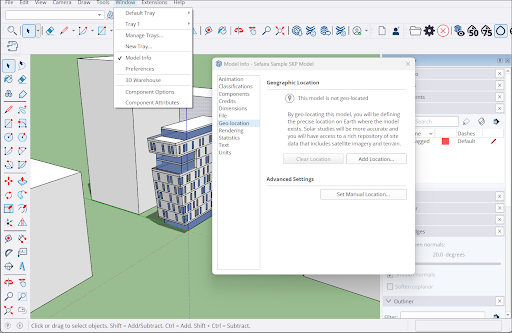
The Add Location window will appear.
For next steps see:
- Geolocating with Add Location - A guide to adding geolocation data.
- Site Context with Add Location – Adding site context such as map imagery to your models.
- Geolocation in Model Info – The Geo-Location section of Model Info is where you can find your location data and also contains a few other options.
- Clearing Geolocation Data – How to clear location data using Add Location or Model Info.
- Deleting Imagery – How to delete imported map imagery.
- Using Your Own Image for Site Context – A guide to using your own image with Add Location data.
Still need help?
Technical support from our New Zealand team is available to customers with a current Procadsys SketchUp Plus subscription: Pro Plus, Pro Scan Plus, Pro Civil Contractor Plus, Advanced Workflows Plus or Studio Plus. Self-help articles are public.
Contact SketchUp support