V-Ray for Nuke
Light Linker | VRayLightLinker
The VRayLightLinker allows you to link lights with surfaces so that only a specific light (or group of lights) illuminates a specific surface (or group of surfaces), or conversely, only a specific object (or group of objects) receive illumination from a specific light (or group of lights).
Last updated 18 September 2025
Overview
The VRayLightLinker allows you to link lights with surfaces so that only a specific light (or group of lights) illuminates a specific surface (or group of surfaces), or conversely, only a specific object (or group of objects) receive illumination from a specific light (or group of lights).
UI Path: ||Toolbar|| > V-Ray Menu icon > Utility Nodes > VRayLightLinker
Parameters
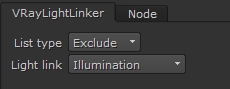
List type – Sets the way lights are treated by the Light Linker.
- Exclude – exclude the selection from illumination and/or shadow-casting for this light.
- Include – include the selection in the illumination and/or shadow-casting for this light.
Light link – Select which part of the lighting will be affected by the Light Linker.
- Illumination – exclude/include the selection from illumination for this light.
- Shadow casting – exclude/include the selection from shadow-casting for this light.
- Both – exclude/include the selection from illumination and shadow-casting for this light.
Example use
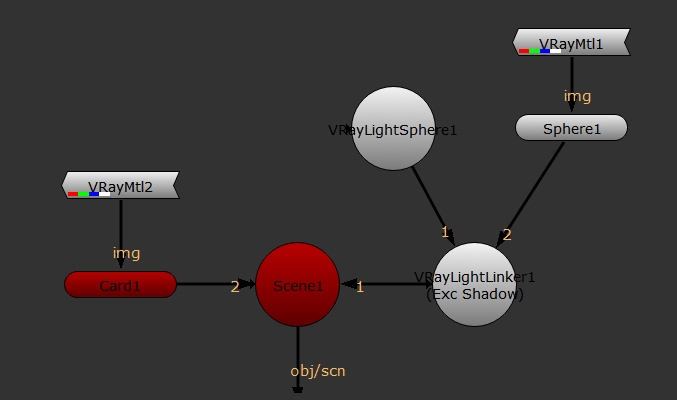
In this example VRayLightLinker is used to exclude the VRayLightSphere from casting shadows for Sphere 1.