V-Ray for Nuke
VRayMtlAssign
This page provides information on the VRayMtlAssign utility.
Last updated 18 September 2025
This page provides information on the VRayMtlAssign utility.
Overview
VRayMtlAssign is an utility that allows the user to quickly assign V-Ray Materials to multiple objects. In order to use it, a VRayMtl must be in the scene, then select an object or a group of objects and create the node. The Assign existing material window will launch.
If you are assigning a material to multiple objects, make sure that you are not creating the node right over a geo node or it will not assign the corresponding material to all of the selected nodes.
UI Path: ||Toolbar|| > V-Ray menu icon > Utilities > VRayMtlAssign

Options
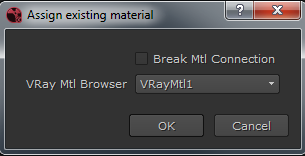
Break Mtl Connection – When enabled, existing connections will be broken before the new material assignments are made. When disabled, existing connections will remain the same.
VRay Mtl Browser – Allows the user the specify which VRayMtl will be applied to the selected object(s).