V-Ray for Nuke
VRayMaterialPreview
This page provides information on the VRayMaterialPreview utility node.
Last updated 18 September 2025
This page provides information on the VRayMaterialPreview utility node.
Overview
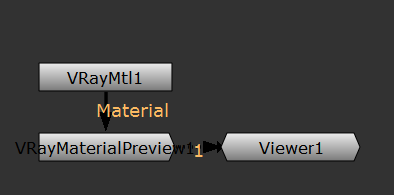
The VRayMaterialPreview is an utility node that allows the user to quickly preview a material that is being edited. To do that, connect the nodes like in the image below:
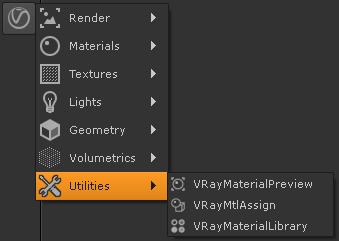
UI Path: ||Toolbar|| > V-Ray menu icon > Utilities > VRayMaterialPreview
Inputs
The VRayMaterailPreview node has three inputs:
Material – The material that will be previewed by the utility.
custom_geo – An optional input to load a custom geometry object for the preview when Geo is set to Custom.
custom_hdr – An optional input to load a custom HDR file when Lights is set to Dome and HDR is set to Custom.
Parameters
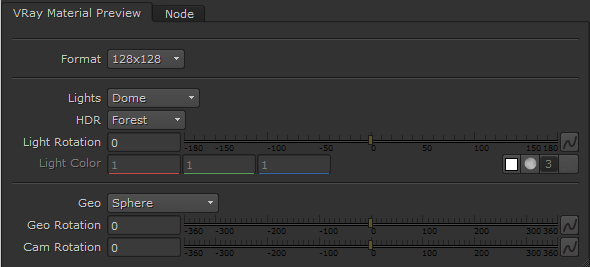
Format – Controls the resolution at which the preview of the material is rendered.
Lights – Specifies how to illuminate the sample geometry that the material will be applied to.
Dome – Image based illumination.
Sphere – A spherical light source.
Rect – Rectangular light source.
Rect Direct – A rectangular light source which uses direct light.
Direct – An infinitely small point light source which generates direct light.
HDR – When Lights is set to Dome this dropdown menu allows you to pick the environment in which the sample geometry is rendered.
Light Rotation – Allows you to rotate the HDR texture when Lights is set to Dome.
Light Color – Set the color of the lights. This option is accessible when a light other than Dome is selected.
Geo – Allows you to pick from a list of sample geometry objects to render in the material preview.
Geo Rotation – Rotates the geometry.
Cam Rotation – Rotates the preview camera.