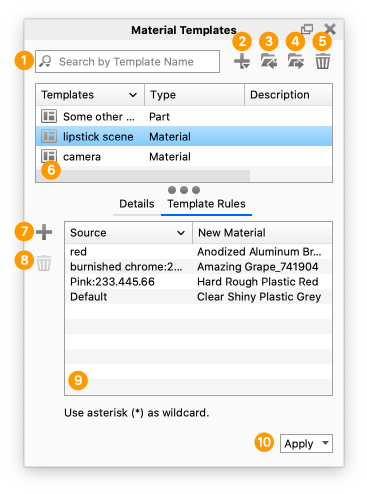
Open the Material Templates window from Window in the Main Menu or select the  Material Template button in the Tools section of the Ribbon.
|
Read more about Material Templates.
KeyShot Studio, User Interface
Use the Material Templates window in KeyShot to manage material templates. Open it from Window in the Main Menu or with the Material Template button in the Tools section of the Ribbon.
Open the Material Templates window from Window in the Main Menu or select the Material Template button in the Tools section of the Ribbon.
|
Read more about Material Templates.
Procadsys customer support
Our New Zealand team looks after your KeyShot licences, renewals and invoices.
Monday to Friday, 9:00 am to 4:30 pm NZ time, excluding New Zealand public holidays.
Installation errors, crashes and other technical problems with KeyShot are handled by KeyShot support.