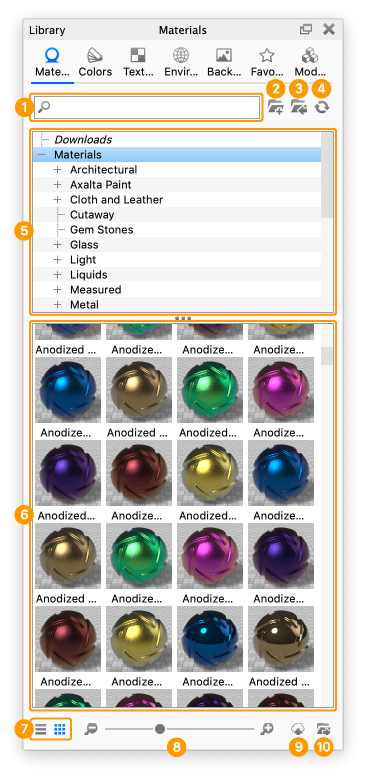
The Materials tab is located in the Library window and contains all the preset and saved materials in your library.
Last updated 3 August 2026
The Materials tab is located in the Library window and contains all the preset and saved materials in your library.
Search Type in any keyword to search for a material by name.
Add Folder Click this button to add custom material folders.
Import Import a material file. You may import the following formats directly into the library: MTL,, AxF, U3M, and KMP (KeyShot Studio’s native material format).
Refresh Refresh material list if any changes were made.
Folder Tree Contains the folder structure of the material folders.
Material Thumbnails Material ball swatches of materials within the selected folder.
List/Thumbnail Toggle Switch displaying the materials with thumbnails and in a list view.
Zoom Slider Slide to change the size of the thumbnails. You can also use +/- to change in steps.
Upload to Cloud Library Click this button to upload a custom material to the Cloud Library.