Use Still Image in KeyShot Studio to render a single static image. You can also use render layers, render passes and region rendering.
Output options
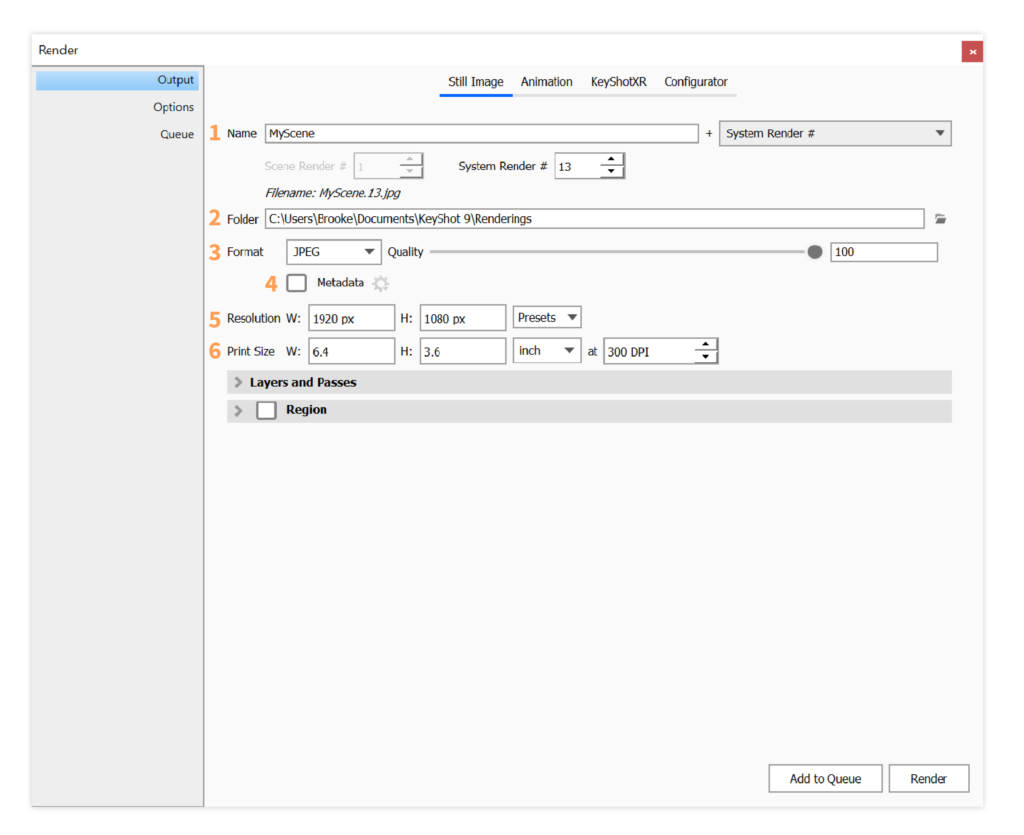
1. Name 2. Folder |
3. Format
Choose PNG, JPEG, EXR, TIFF, TIFF 32-bit, PSD, PSD 16-bit or PSD 32-bit. All formats except JPEG can include an alpha channel. If you select PSD, PSD 16-bit or PSD 32-bit, the Add to PSD checkbox appears in the Layers and Passes section. If you select JPEG, an image quality slider appears so you can adjust image quality and file size.
Include Alpha (transparency)
If your selected format supports transparency, you can include it in your image.
4. Metadata
Enable this option to save a metadata file with your still image. It records the scene name, Camera name and properties, Environment name and properties, active Model Sets, active Studio, Lighting settings, material names and Render Quality settings.
Click  to select the metadata format:
- .xmp files open in any text editor. You can also import them into Adobe applications.
- Simple (.meta) files are formatted for easier reading.
5. Resolution
Set the render resolution by typing a value or selecting a preset.
6. Print Size
For print output, enter the print dimensions and DPI you need. The resolution updates to match the dimensions you set.
Layers and passes
See the Layers and Passes page.
Region
See the Region Rendering page.