Skip to content
07-848 2005

KeyShot Studio, textures

Volume map

Use OpenVDB files as textures in KeyShot. Volume maps are primarily used as density textures with Scattering Medium.
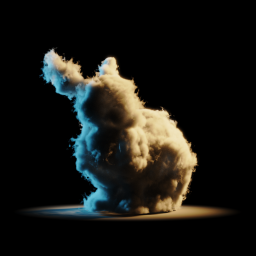
Use OpenVDB files as textures in KeyShot. Volume maps are primarily used as density textures with Scattering Medium.

DramaticVDBBunny

This example shows a cube with a scattering medium material and a volume map as its density texture.

File
Browse for the texture file. Volume maps only support .vdb files.

Center on
Centre the texture on the model or part. Use the Move Texture tool for finer position adjustments.

Move texture
Move the texture. See the Move Texture page for details.

Scale
Use the slider to adjust the texture size. The scale uses the current scene units.

Fit to part
Scale the texture to fit the part.

Adapted from KeyShot Studio documentation: Volume map. © 2026 KeyShot

Procadsys customer support

Still need help?

Licences, renewals and billing

Our New Zealand team looks after your KeyShot licences, renewals and invoices.

Monday to Friday, 9:00 am to 4:30 pm NZ time, excluding New Zealand public holidays.

Technical problems

Installation errors, crashes and other technical problems with KeyShot are handled by KeyShot support.