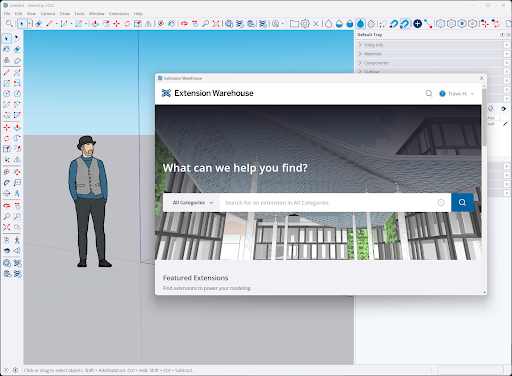
Use Extension Warehouse to find and download third-party extensions for the SketchUp desktop application. You can also submit and share your own extensions.
Each extension adds tools for a specific task in SketchUp. Developers write these extensions in Ruby using the Ruby API. For example, extensions can help you find empty spaces in your model or import files from another program, such as Polycam.
Accessing Extension Warehouse
You can open Extension Warehouse in SketchUp or your web browser. In SketchUp, there are two ways to open it:
- Click Extension Warehouse (
 ) in the Getting Started Toolbar or the Large Tool Set.
- Select Extensions > Extension Warehouse from the menu bar.
Extension fees
Developers may charge a fee to download an extension. Prices appear in search results and on the extension's details page. Some developers provide downloads and pricing only on their own site. These extensions have a Listing Page tag in search results and a link to the developer's site on the details page.
Extension Warehouse listings show these pricing options:
- Free means you can download the extension at no cost.
- Fixed Term means you pay a recurring fee. The price shows the term next to the amount, for example, $5.00/Year.
- Perpetual Extension means you pay a one-off fee. The price appears in the extension's listing.
These guides explain how to sign in, navigate Extension Warehouse and find extensions:
- You need to sign in to use Extension Warehouse. Signing Into Extension Warehouse explains how to sign in through a web browser.
- The Extension Warehouse Interface explains how to navigate Extension Warehouse.
- Searching Extension Warehouse explains how to use the search options to find extensions.