Use the General tab to change basic settings for your LayOut documents.
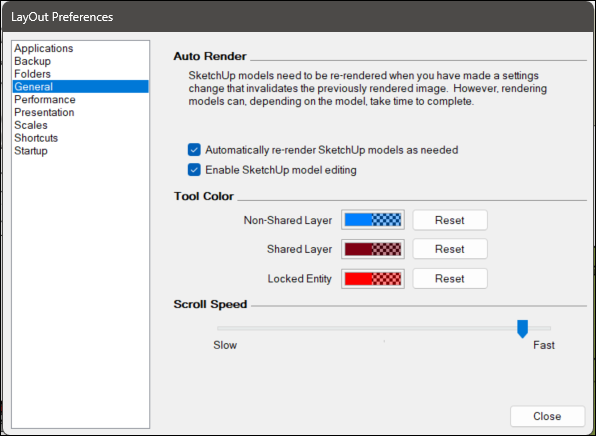
Auto-Renderer
Use the Auto-Renderer section to control how SketchUp models behave in your LayOut document.
By default, LayOut renders SketchUp models as needed. Large models can take time to render. Turn off Automatically re-render SketchUp models as needed to render models only when you select Render Model from the context menu.
Double-click inside a SketchUp model viewport to navigate around the model. Turn off Enable SketchUp model editing if you want to prevent navigation inside the viewport.
Tool Color
LayOut uses highlight colours to show information about a selected object. Use the Tool Color section to change these colours. The options are:
- Non-Shared Layer
- Shared Layer
- Locked Entity
To restore a default colour after changing it, click Reset next to that option.
Scroll Speed
Adjust Scroll Speed to control how quickly LayOut zooms in or out when you use the middle mouse wheel. Slow requires more wheel rotations to zoom. Fast requires fewer.