Selecting Scenes
SketchUp scenes help you save a specific view of a model. If you have more than one scene saved to a model you can switch between them within its viewport.To change a SketchUp model’s scene from the SketchUp model Panel:
Last updated 17 July 2026
SketchUp scenes help you save a specific view of a model. If you have more than one scene saved to a model you can switch between them within its viewport.
To change a SketchUp model’s scene from the SketchUp model Panel:
- Select your SketchUp model.
- Under Viewport, click the Scene dropdown menu.
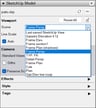
- Select the name of the scene you want from the list.
To change a SketchUp model’s scene using the context menu:
- Context-click in the SketchUp model’s viewport.
- Select Scenes.
- Select the name of the scene you want to use.

Still need help?
Technical support from our New Zealand team is available to customers with a current Procadsys SketchUp Plus subscription: Pro Plus, Pro Scan Plus, Pro Civil Contractor Plus, Advanced Workflows Plus or Studio Plus. Self-help articles are public.
Contact SketchUp support