How shading is calculated
PreDesign calculates the results in the Shading lens using weather data and assumptions about your building. This article explains:
- The approach behind the calculation.
- How balance point temperatures and schedules affect the results.
- How sun quality is determined for each hour and sun patch.
- How PreDesign decides whether to recommend shading for a facade.
- How PreDesign scores shading options.
These resources explain the shading feature and strategies:
- Shading Feature Overview
- Seasons Overview
- What the shading strategies include
The calculation approach
You can use shadows in SketchUp to see when parts of a building or site are in sun or shade. Shadows assume sunny conditions. They do not show whether the sun is likely to help warm the building or cause overheating.
The shading feature combines the sun's position and shadows with historical weather conditions. It uses this information to assess how the sun affects different building types.
PreDesign classifies sun quality at any time into one of three categories:
- Beneficial / warming. Sun adds warmth when the building needs it. This helps reduce heating energy use and improves comfort, although it may still cause glare.
- Detrimental / overheating. Sun adds heat when the building needs to cool down, so blocking it is preferable. It increases cooling energy use, reduces comfort and may require larger heating, ventilation and air conditioning systems.
- Benign / passive. Sun has little or no effect on the building. Clouds may block it, or sunlight entering the building may make no difference.
PreDesign uses these categories to recommend whether shading is needed and assess shading options.
Balance point temperatures and sun quality
You do not upload a building model to PreDesign, so it has no building geometry to assess. Instead, it uses the balance point temperature (BPT) to determine sun quality.
Determining balance point temperatures for different building types
BPT and similar methods are documented in several references. BPT is the outside air temperature at which heat gained inside a building equals heat lost to the outside.
At the balance point temperature:
internal loads (lights+equipment+occupants) = heat loss through facade (conduction+infiltration)
The balance point temperature depends on assumptions about the building's internal loads and facade design. The table below lists these assumptions and the resulting balance point temperature for each building type.
Assumption | Residential | Office | School |
Diversified occupant load (W/m2) | 3 | 7 | 8 |
Diversified equipment load (W/m2) | 4 | 10 | 3 |
Diversified lighting load (W/m2) | 3 | 5 | 3 |
Assembly U-value (Glazing + Opaque) (W/m2/°K) | 1.7 | 1.5 | 1.5 |
Infiltration rate (air changes / hr) | 0.5 | 0.5 | 0.5 |
Resulting balance point temperature | 17°C / 62.6°F | 11°C / 55.4°F | 15°C / 59°F |
The BPT calculation assumes a perimeter room depth of 4 m and a wall height of 2.7 m.
Using balance point temperature (BPT) to determine sun quality
PreDesign combines the BPT with these hourly values to determine whether sun is beneficial, warming or overheating:
- Global Radiation (in W/m2, from the hourly weather file).
- Direct Normal Radiation (in W/m2, from the hourly weather file).
- Dry Bulb Temperature (in °C, from the hourly weather file).
Global Radiation represents heat from the whole skydome. Direct Normal Radiation represents heat from direct sun. PreDesign uses these values together to determine:
- When sun is passive and has no effect.
- When sun is particularly hot and more likely to cause overheating.
Higher radiation values mean more heat enters the building from the sun and sky. PreDesign lowers the BPT to account for this heat. The reference table at the end of this article shows the adjustments.
For each time step, PreDesign compares the modified BPT with the outside dry bulb temperature:
- If the modified BPT is below the outside dry bulb temperature, the condition is detrimental/overheating. It is hotter outside than the desired indoor temperature.
- If the modified BPT is above the outside dry bulb temperature, the condition is beneficial/warming. It is colder outside than the desired indoor temperature.
PreDesign also calculates degree hours of overheating sun and degree hours of warming sun for each time step. These values measure the extent of each effect:
Degree hours of Overheating Sun = Outside Temperature - modified BPT - 3
Degree hours of Warming sun = Modified BPT - Outside Temperature + 3
The adjustment of 3 above allows for a temperature band on either side of the setpoint.
The minimum degree hours for either calculation is zero.
These calculations classify each hour as passive, detrimental or beneficial. They also measure the extent of overheating or warming during that hour.
Classifying sun patches
The shading feature groups similar sun positions into areas called patches on the sun path diagram. Patches help you see sun quality trends over the year and compare the effects of shading strategies.
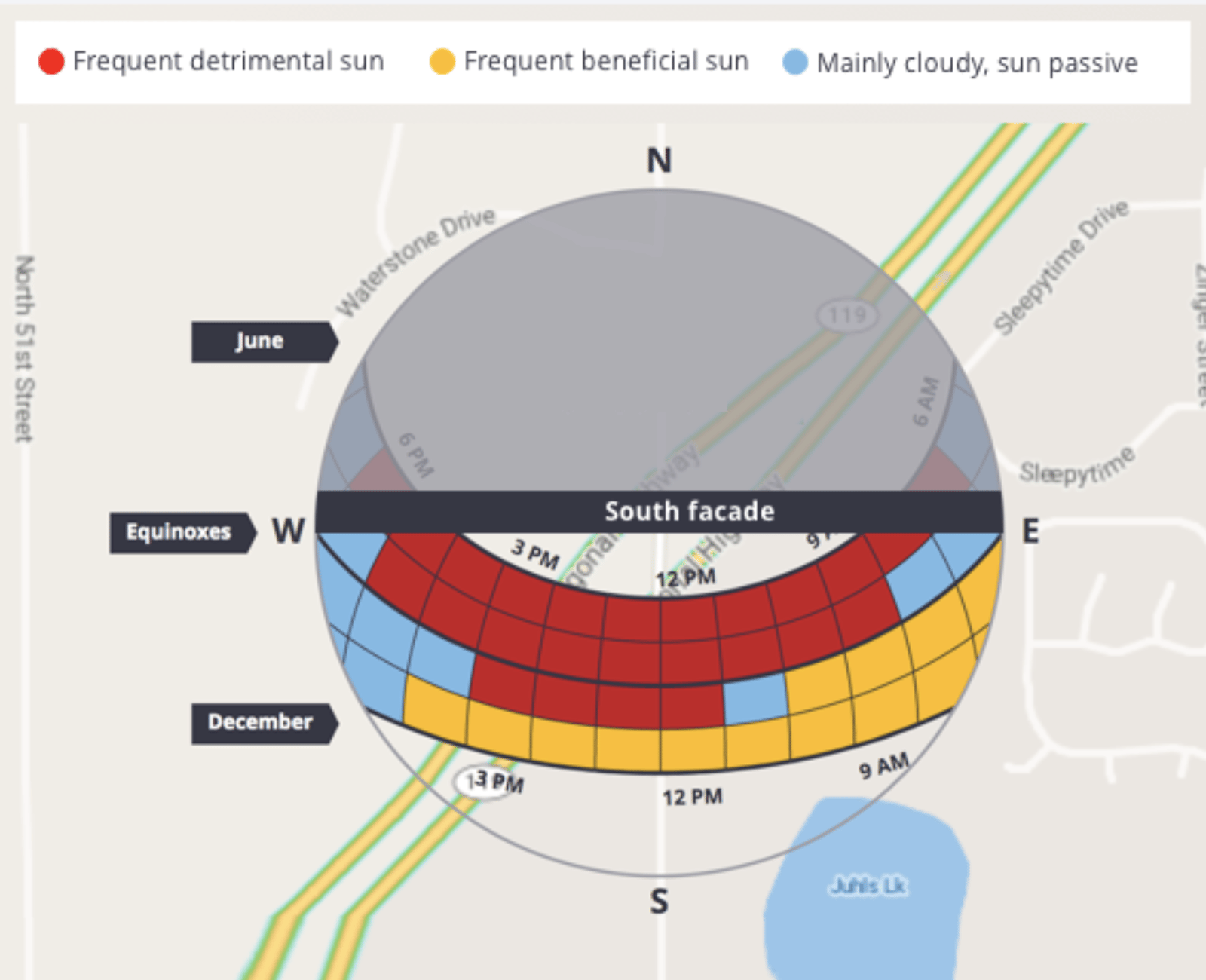
Each patch represents approximately 90 different days at the same time of day, when the sun is in roughly the same position in the sky.
PreDesign classifies each patch using the total overheating degree hours and warming degree hours for all time steps in that patch:
Total sky patch overheating degree hours | Total sky patch warming degree hours | Patch characteristic |
>500 degC.h | Any | Detrimental overheating |
>=200 degC.h, <500 | =< SkyPatch Overheating Degree hours Total | Detrimental overheating |
>=200 degC.h, <500 | > SkyPatch Overheating Degree Hours Total | Beneficial warming |
<200 degC.h | >=200 degC.h | Beneficial warming |
<200 | <200 | Passive |
How shading recommendations are made
Patches show annual trends on the sun path diagram. PreDesign uses hourly calculations to recommend whether shading is needed and assign star ratings to shading options.
The summary view of the shading page includes a shading recommendation, as shown below.
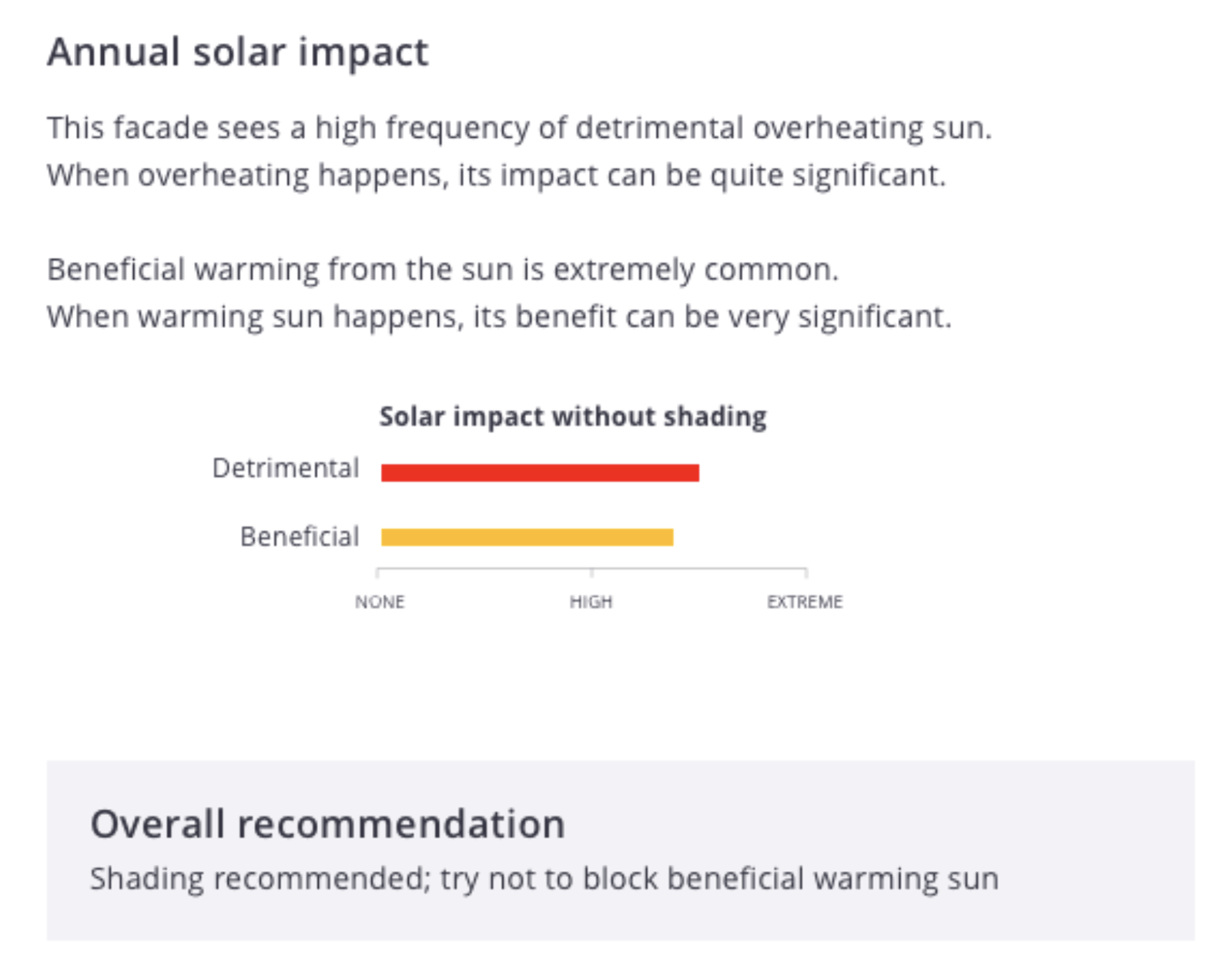
For each time step, PreDesign follows these steps:
- Start with the overheating or warming degree hours for that time step.
- Adjust the value for the angle at which sun strikes the facade. Time steps when the sun is behind the facade count as zero.
The calculation gives these annual totals:
- Total overheating degree hours for each typical facade orientation, calculated by adding the hourly values over the year.
- Total warming degree hours for each typical facade orientation, calculated by adding the hourly values over the year.
The chart in the summary view shows both totals.
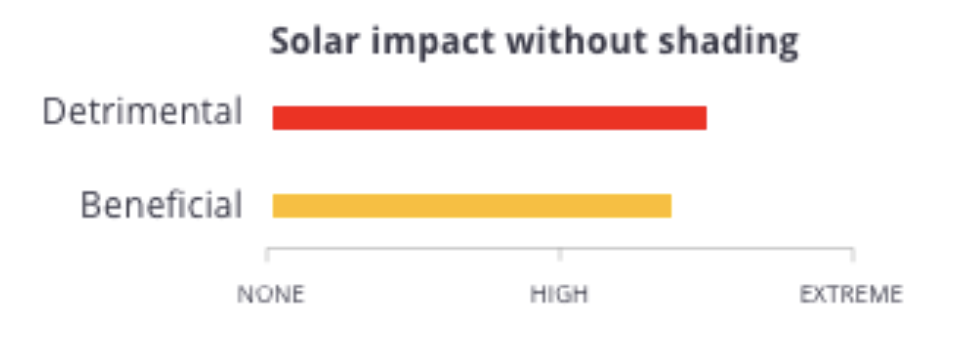
The chart uses a fixed scale. Extreme equals 5,000 degree hours, and High equals 2,500 degree hours.
The overall shading recommendation appears as shown below.

PreDesign uses these totals to recommend shading for each facade:
Shading recommendation logic | Total warming degree hours on the facade | ||
≤ 1,000 | > 1,000 | ||
Total overheating degree hours on the facade | ≤ 500 | Shading is not needed. | Allow beneficial warming sun into the building. Avoid shading. |
> 500, ≤1000 | Shading offers limited benefits. Use glazing with good solar control. | Allow beneficial warming sun into the building. Avoid shading. | |
> 1,000, ≤2,000 | Consider shading or glazing with good solar control. | Consider shading. Try to keep beneficial warming sun from being blocked. | |
> 2,000, ≤4,000 | Shading is recommended. | Shading is recommended. Try to keep beneficial warming sun from being blocked. | |
> 4,000 | Shading is strongly recommended. | Shading is strongly recommended. Try to keep beneficial warming sun from being blocked. |
How shading options are scored
PreDesign displays shading options as shown below.
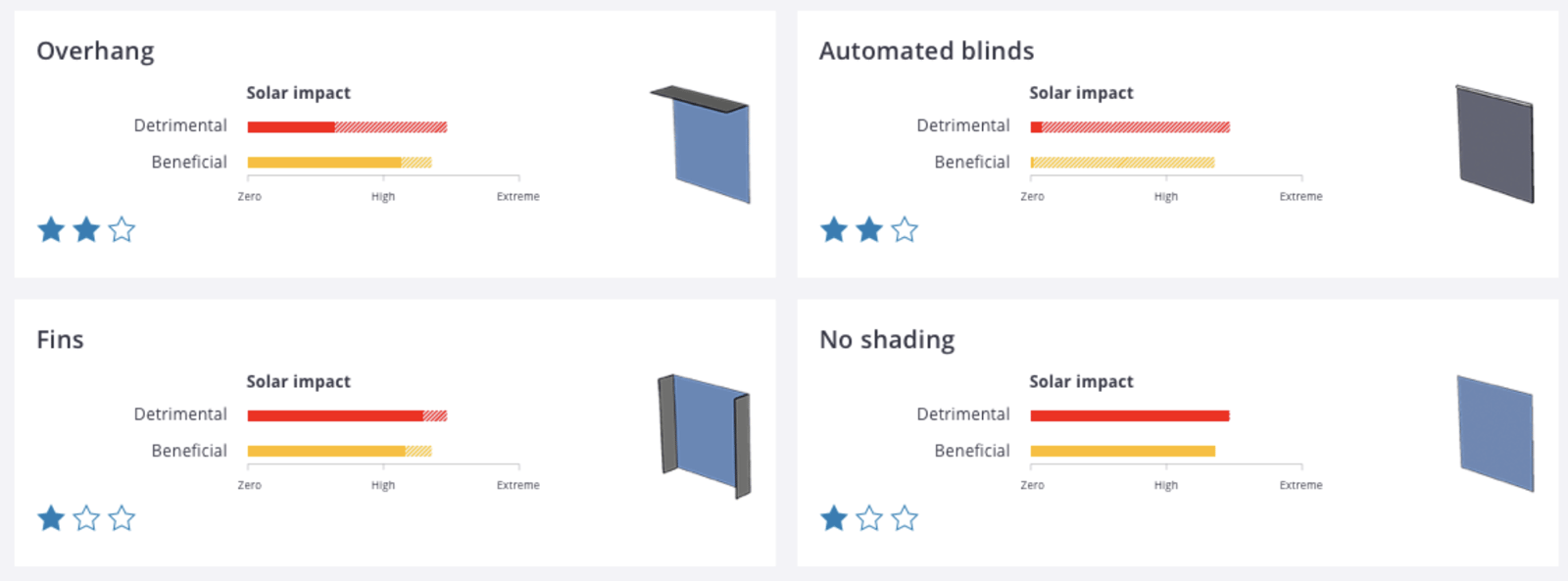
For each shading option, PreDesign follows these steps at each time step:
- Identify the percentage of glazing shaded from the sun at that time step.
- Record the overheating and warming degree hours blocked and let in at that time step.
This gives the following annual totals for each shading option:
- Total overheating degree hours blocked for each typical facade orientation, calculated by adding the hourly values over the year.
- Total overheating degree hours let in for each typical facade orientation, calculated by adding the hourly values over the year.
- Total warming degree hours lost through shading for each typical facade orientation, calculated by adding the hourly values over the year.
- Total warming degree hours let in for each typical facade orientation, calculated by adding the hourly values over the year.
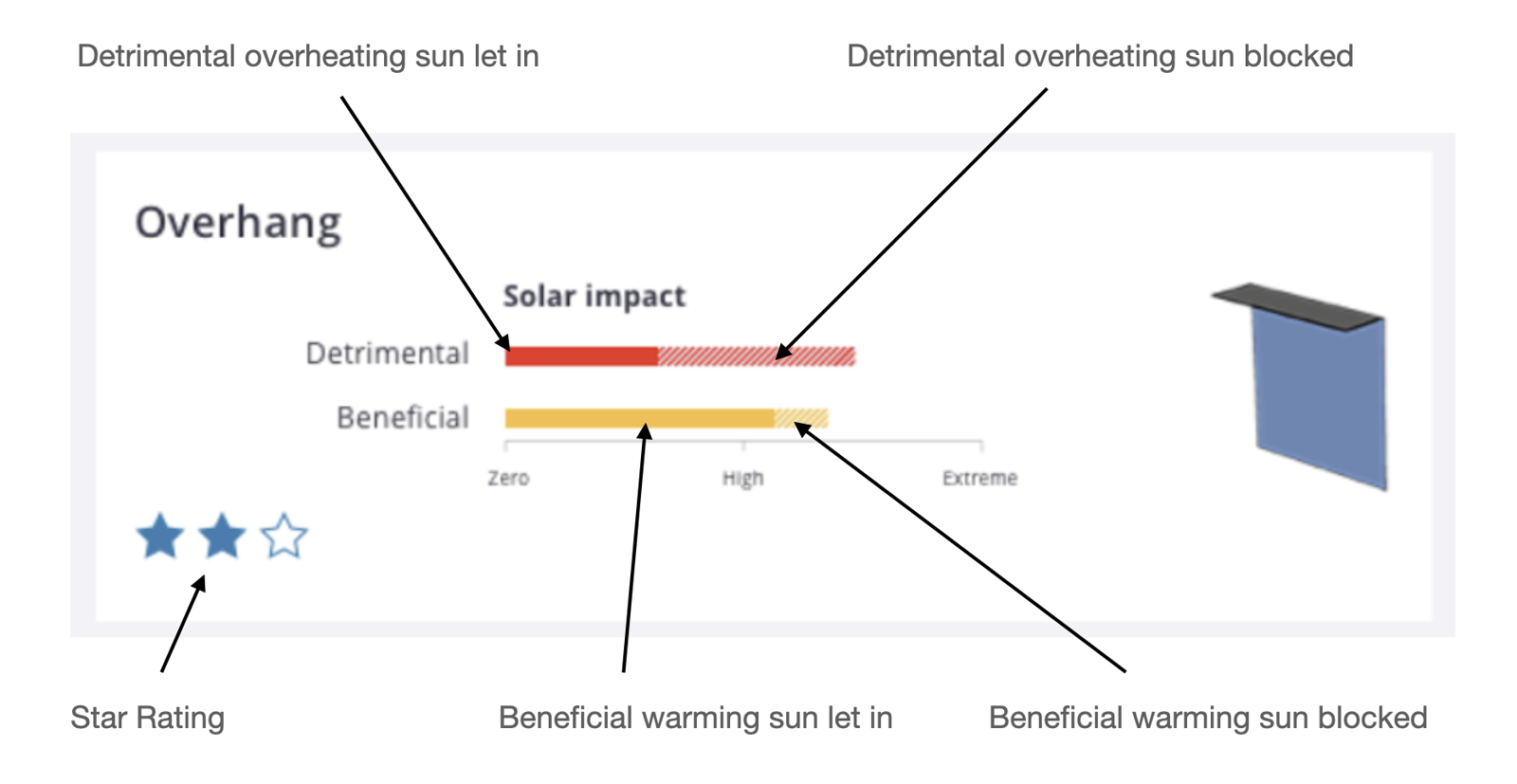
The star rating depends only on the overheating and warming sun blocked by the shading device.
final score = overheating degree hours blocked -0.5 ( warming degree hours blocked)
For the no shading option, the score depends only on the sun let in:
final score = 2,000- overheating degree hours let in +0.5 ( warming degree hours let in)
PreDesign awards stars based on the final score:
Final score range | Number of stars |
>2,000 degree hrs | 3 |
>1,000 degree hrs, <= 2,000 degree hrs | 2 |
>0 degree hrs, <= 1,000 degree hrs | 1 |
<0 degree hrs | 0 |
References and supporting tables
Balance point temperatures
PreDesign's use of balance point temperatures draws partly on these references:
- Heating, Cooling, Lighting. Sustainable Design Methods for Architects. Norbert Lechner. Third Edition, 2009. Wiley.
- Sun Wind and Light. Architectural Design Strategies. 2nd Edition. Brown, GZ & Dekay, Mark. 2000. Wiley.
Balance point temperature modifiers and sun quality conditions based on Global and Direct Normal Radiation
Global Radiation | Direct Normal Radiation | Balance point temperature modifier for hot sun conditions | Outside air temperature relative to modified BPT | Sun quality for the time step |
Up to 800 | >0, <80 | 0 | Any | Cool sky |
80-250 | 0 | OA >=MBPT | Warming sun | |
80-250 | 0 | OA > MBPT | Overheating sun | |
250-500 | -2 | OA >=MBPT | Warming sun | |
250-500 | -2 | OA > MBPT | Overheating sun | |
500-750 | -4 | OA >=MBPT | Warming sun | |
500-750 | -4 | OA > MBPT | Overheating sun | |
Above 750 | -6 | OA >=MBPT | Warming sun | |
Above 750 | -6 | OA > MBPT | Overheating sun | |
Above 800 | Any | -6 | OA >=MBPT | Warming sun |
Any | -6 | OA > MBPT | Overheating sun |