V-Ray for 3ds Max
Render Elements
This page is about render elements and their basic usage.
Last updated 1 September 2026
This page is about render elements and their basic usage.
Overview
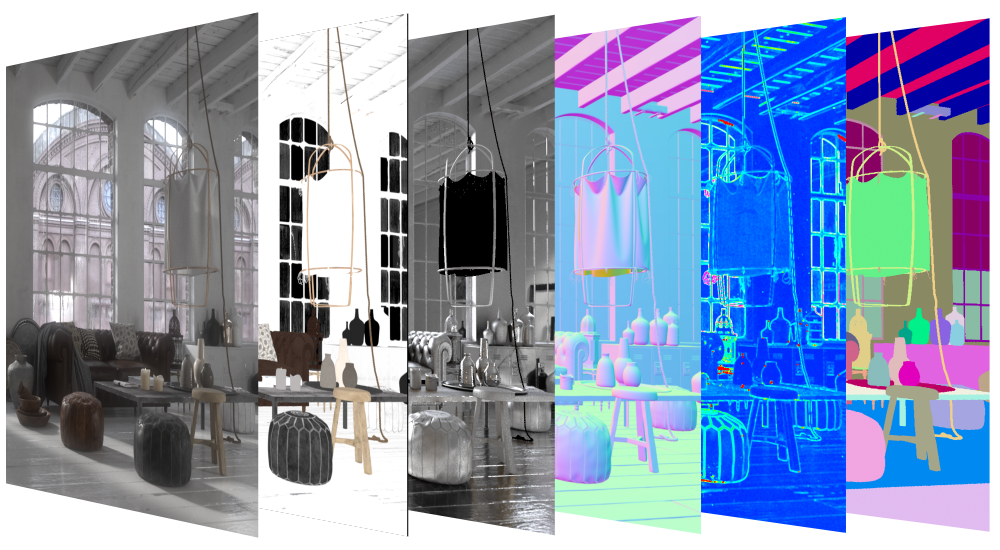
Render Elements are a way to break out renders into their component parts such as diffuse color, reflections, shadows, mattes, etc. This gives fine control over the final image when using compositing or image editing applications when re-assembling the final image from its component elements. Render elements are also sometimes known as render passes.
Render Elements are generated at render time based on the ones you choose before rendering. Most render elements have parameters that can be set to customize the render element or its later use in compositing software. These parameters are described on each render element's individual page, along with common uses and any notes on their generation and usage.
V-Ray supports the built-in 3ds Max Render elements user interface. However, V-Ray provides its own render elements and does not support the standard render elements implemented in 3ds Max. Therefore standard 3ds Max render elements do not work with V-Ray, and vice versa.
For a complete list of render elements, see the List of Supported Render Elements. All render elements support native V-Ray materials. Some render elements also support standard 3ds Max materials.
UI Path

Supported Render Elements
The following render elements are supported by V-Ray. All render elements support native V-Ray materials. Some render elements also support standard 3ds Max materials, and are noted in the table below.
*Click on a column header to sort the elements alphabetically by that column.
Render element name | VRayMtl | Standard material | Filtering | Transparency | Color Depth of EXR floating-point channels1 | Use | Description |
|---|
Render element name | VRayMtl | Standard material | Filtering | Transparency | Color Depth of EXR floating-point channels1 | Use | Description |
|---|---|---|---|---|---|---|---|
N/A | 16bit/32bit | Masks | Creates selection masks based on object G-buffer ID or material ID. | ||||
2 | 16bit/32bit | Masks | Alpha transparency | ||||
16bit/32bit | Overall Post-processing | Ambient occlusion effect | |||||
2 | 16bit/32bit | Beauty (main) | Atmospheric effects | ||||
2 | 16bit/32bit | Beauty (main) | The image background | ||||
– | – | – | – | 16bit/32bit | Assemblies for quick vfb processing workflows | Expands as all beauty elements for the actual rendering. | |
16bit/32bit | Extended effects Post-processing | The normals generated by bump maps, in screen space (which is not the same as camera space). Use the VRaySamplerInfo render element to get the normals in camera, world or object space. | |||||
4 | 2 | 16bit/32bit | Beauty (main) | The caustics on the material. Only present when the Caustics option of V-Ray is enabled. This channel does not include GI caustics. | |||
16bit/32bit | Filter | Reflection filter for VRayMtl Coat layer. | |||||
16bit/32bit | Extended components | Returns a float value that corresponds with the Coat Glossiness value of the VRayMtl Coat layer. | |||||
16bit/32bit | Extended components | Indirect reflections coming from the Coat layers of VRayMtl used in the scene. | |||||
16bit/32bit | Extended components | Direct surface specular highlights coming from the VRayMtl Coat layer used in the scene. | |||||
forced 32bit (for multi-channel files) | Masks | Uses the Cryptomatte convention by Psypop to encode mattes into multichannel OpenEXRs. | |||||
16bit/32bit | Assemblies for quick vfb processing workflows | Applies a denoising operation to the image after it is rendered (with the necessary channels). | |||||
2 | 16bit/32bit | Filter | The pure diffuse surface color. Note that this is different from the standard 3ds Max Diffuse render element, which contains the diffuse surface lighting. | ||||
N/A | N/A | N/A | N/A | 16bit/32bit | Diagnostic | Shows which render node rendered which bucket during distributed rendering | |
16bit/32bit | Auto-generated masks for AI enhancement | Contains 3 render channels in itself which are auto-generated: MaterialID, ObjectID and depth. They are needed for proper AI enhancement. | |||||
N/A | N/A | N/A | forced 32bit (optional for multi-channel files) | Masks/Overall Post-processing/Diagnostic | Renders the entire scene with one texture mapped on all objects. | ||
16bit/32bit | Masks/Overall Post-processing | Isolates the VRayGaussiansGeom geometry in the scene. | |||||
4 | 2 | 16bit/32bit | Beauty (main) | The diffuse surface global illumination. Only present if Global illumination is enabled. | |||
2 | 16bit/32bit | Beauty (main) | The diffuse direct surface lighting. | ||||
16bit/32bit | Overlay Post effects/Diagnostic | Provides visual representation of the lighting intensity within a rendered frame. | |||||
N/A | N/A | N/A | N/A | 16bit/32bit | Assemblies for quick vfb processing workflows | Adjusts intensity and color of lights and light emitting materials during and after render directly from the VFB. | |
16bit/32bit | Direct Post-processing | Extracts the contribution of a user-defined light or a set of lights in the scene as a separate render element. | |||||
16bit/32bit | Overall Post-processing | The matte shadow part of the image. | |||||
16bit/32bit | PBR material components | Creates a black and white image, which can be used as a metalness mask when creating PBR shaders. | |||||
3 | Masks | The material ID of the object. | |||||
16bit/32bit | Extended components | Grayscale image from materials' reflection glossiness amount. | |||||
16bit/32bit | Extended components | Grayscale image from materials' highlight glossiness amount. | |||||
N/A | 16bit/32bit | Extended components | Grayscale float image from materials' Fresnel reflections IOR amount. | ||||
16bit/32bit | Extended components | Grayscale image from materials' refraction glossiness amount. | |||||
16bit/32bit | Direct Post-processing | This element allows you to write the result of a V-Ray compatible material into a separate element. The material can be a top-level material or a sub-material of VRayMtlBlend. | |||||
16bit/32bit | Diagnostic | Outputs the noise level for pixels. Same as the noiseLevel render element produced by the VRayDenoiser, but as a standalone render element. | |||||
16bit/32bit | Extended effects Post-processing | The surface normals in screen space (which is not the same as camera space). To output the normals in camera/object/world space, use VRaySamplerInfo render element. | |||||
3 | Masks | The object G-buffer ID (set through the node's Properties dialogue). | |||||
16bit/32bit | Direct Post-processing | Stores only the object(s) called out with a specific Object or Material ID. | |||||
N/A | N/A | N/A | N/A | 16bit/32bit | Miscellaneous | Controls some internal settings for V-Ray that are otherwise inaccessible. | |
16bit/32bit | Raw Filter | Creates a solid mask showing the areas of reflection in the Coat layer without being affected by Fresnel. | |||||
16bit/32bit | Raw | Pure surface indirect reflection from a VRayMtl Coat layer before it is multiplied by the reflection filter color. | |||||
16bit/32bit | Raw Filter | A solid mask of raw diffuse surface color information not affected by fresnel falloff. | |||||
2 | 16bit/32bit | Raw | The raw diffuse global illumination (not multiplied by the diffuse surface color). Only present if Global illumination is enabled. | ||||
2 | 16bit/32bit | Raw | The raw diffuse direct illumination before it's multiplied by the diffuse surface color. | ||||
2 | 16bit/32bit | Raw | The pure surface reflection, before it is multiplied by the reflection filter color. | ||||
N/A | 16bit/32bit | Raw Filter | A solid mask of raw reflection information not affected by fresnel falloff. | ||||
2 | 16bit/32bit | Raw | The pure surface refraction before it is multiplied by the refraction filter color. | ||||
N/A | 16bit/32bit | Raw Filter | A solid mask of raw refraction information not affected by fresnel falloff. | ||||
2 | 16bit/32bit | Raw | The raw light that was blocked by other objects. | ||||
16bit/32bit | Raw Filter | Holds information similar to Sheen Filter RE, but without being affected by Fresnel. | |||||
16bit/32bit | Raw | Pure surface indirect reflection from a VRayMtl Sheen layer before it is multiplied by the reflection filter color. | |||||
16bit/32bit | Raw | The sum of all raw lighting - direct and indirect. | |||||
2 | 16bit/32bit | Beauty (main) | The reflections on the surface. | ||||
2 | 16bit/32bit | Filter | The reflection filter (the color by which the raw reflections are multiplied to give the final surface reflection). This may be considered as an alpha channel for the reflections. | ||||
2 | 16bit/32bit | Beauty (main) | The refractions on the surface. | ||||
2 | 16bit/32bit | Filter | The refraction filter (the color by which the raw refractions are multiplied to give the final surface refraction). This may be considered as an alpha channel for the refractions. | ||||
3 | Masks | The node render ID of the object that contributes most to the pixel value. | |||||
16bit/32bit9 | Diagnostic | Shows a floating-point number for each pixel's render time measured in milliseconds. | |||||
16bit/32bit | PBR material components | Bakes the Reflection Roughness values in a scene, creating a black and white image. | |||||
N/A | N/A | N/A | N/A | 16bit/32bit | Diagnostic | Shows an image where the pixel brightness is directly proportional to the number of samples taken at this pixel. | |
N/A | N/A | N/A | N/A | forced 32bit (for multi-channel files) | Extended effects Post-processing | Provides information about various aspects of the shaded points - position, normal, bump normal, reflection/refraction vectors and UVW coordinates. Can be used e.g. for world position passes or normal passes. | |
2 | 16bit/32bit | Beauty (main) | The self-illumination of the surface. | ||||
2 | 16bit/32bit | Overall Post-processing | The diffuse light that was blocked by other objects. | ||||
16bit/32bit | Filter | Reflection filter for VRayMtl Sheen layer. | |||||
16bit/32bit | Extended components | Returns a float value that corresponds with the Sheen Glossiness value of the VRayMtl Sheen layer. | |||||
16bit/32bit | Extended components | Indirect reflections coming from the Sheen layer(s) of VRayMtl used in the scene. | |||||
16bit/32bit | Extended components | Direct surface specular highlights coming from the VRayMtl Sheen layer used in the scene. | |||||
2 | 16bit/32bit | Beauty (main) | The surface specular highlights. | ||||
16bit/32bit | Beauty (main) | Renders just the subsurface part of VRaySSS2 and VRaySkinMtl materials on a separate layer. | |||||
16bit/32bit | Overlay Post effects | Stores the toon outlines information. | |||||
16bit/32bit | Overall Post-processing | The total lighting in the scene, direct and indirect. | |||||
2 | 16bit/32bit | Overall Post-processing | The unclamped image color. | ||||
16bit/32bit | Extended effects Post-processing | The surface velocity. This channel will not be generated if 3d motion blur is enabled. | |||||
16bit/32bit | Masks | The wire color of the object as set in the 3ds Max scene. This can be used to generate masks for the objects based on their wire color. | |||||
forced 32bit (for multi-channel files) | Extended effects Post-processing | The z-depth of the surface. | |||||
16bit/32bit | Masks (Scans) | Allows color changes to a V-Ray Scanned Material in compositing. | |||||
Masks (Scans) | Shows the zone that is a map of the sub-materials. The rendered image is monochrome. The white color specifies the selected zone, whereas the black color specifies the other parts of the image. |
Footnotes
1 – For all image formats except EXR the render elements depend on their respective channels' output settings.
2 – When Enable Filtering is on, the element is dimmed by atmospheric effects like fog, etc. However, when an element is unfiltered, it is not affected by atmospherics.
3 – Filtering is never applied to this Render Element.
4 – For Standard materials, the VRayLighting element includes the direct and indirect lighting, as well as caustics, while the VRayGlobalIllumination and VRayCaustics elements are black. However, for all materials, adding the VRayLighting, VRayGlobalIllumination, and VRayCaustics elements always gives the total diffuse surface lighting.
5 – The background is calculated with unoccluded color by design. You can use compositing with the V-Ray Frame Buffer (VFB).
6 – Forces 32bit only for cryptomatte layers.
7 – The channels needed for the denoise operation are automatically generated when the render element has been added before rendering.
8 – For VRayObjectSelect RE, only Raw mode is currently supported in vrscene export.
9 – VRayRenderTime render element is always forced to be stored as a 32-bit channel when saving V-Ray raw image file (OpenEXR).
Notes
- When the V-Ray VFB is enabled, all V-Ray render elements appear switched off in the Render Elements tab inside the Render Scene dialog. This is a work-around so that 3ds Max does not create its own render elements bitmaps - this is not required as the elements are stored in the V-Ray VFB itself. If the V-Ray VFB is used, the render elements can be enabled or disabled by using their own V-Ray VFB parameter.
- VRayAlpha render element is available as an output only when VFB is disabled from Render Setup > V-Ray tab > Frame buffer rollout > Enable built-in VFB, and an output format is chosen from Render Setup > Common tab > Render Output > Save file.
- V-Ray always antialiases with respect to the RGB color channel. Therefore, other channels may appear jagged or noisy in areas where V-Ray has placed fewer samples.
- Render elements will render in Distributed Rendering mode, both in the V-Ray frame buffer and the 3ds Max frame buffer.
- Render elements require additional storage when rendering and thus increase the amount of RAM taken during the rendering. When rendering to the V-Ray VFB, you can reduce this memory by rendering directly to a .vrimg file on disk and not storing the final image in memory.
- Render elements may slow down the final image rendering a little bit, depending on the number of elements that the user has selected. They have no effect on GI/reflection, etc. calculations.
- The Illuminance Render Element can no longer be created in V-Ray Next and later. Instead, use the Lighting Analysis Render Element. If you work with scenes created with an older V-Ray version that stores this render element, it will be loaded in V-Ray Next and later.
- When selecting the Affect All channels option of VRayMtl/VRayToonMtl, be aware that the information of the respective component will affect all render elements, therefore the Back to Beauty composition will not match the RGB result from the renderer.
- V-Ray follows 3ds Max’s conventions for right-click actions on parameter spinners. Right-clicking a parameter spinner sets its value to the minimum allowed. Ctrl + right-click resets the value to its default. Right-clicking a parameter value opens a dropdown menu with an option to reset it to the default.