Use the  Material Importer tool to import native KMP and MTL files and convert the following 3rd party formats into KeyShot Studio materials.
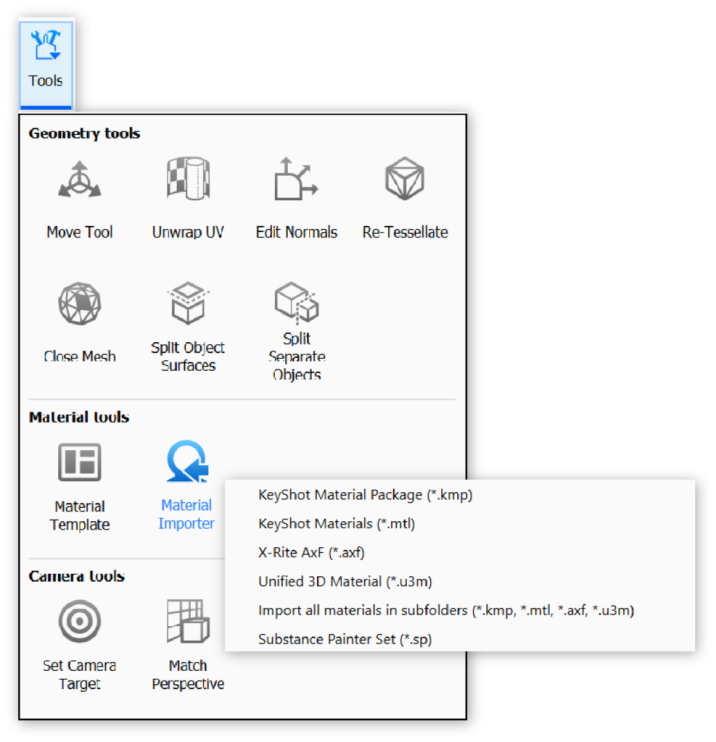
The Material Importer flyout lets you import individual materials (.kmp, .mtl, .axf, .u3m, .sp) or all materials in a folder. To add multiple materials to your library faster, select import all materials in subfolders.
AxF (Appearance Exchange Format)
KeyShot Studio converts imported AxF files into the Measured material and adds them to the selected folder in the Material Library.
To use a material only in the current scene without adding it to the library, select the Measured material in the Material Tab in the Project panel. You can then load the material directly.
U3M (Unified 3D Material)
KeyShot Studio converts imported U3M files into the Generic material and adds them to the selected folder in the Material Library. Read more about the u3m format.
Substance Painter (Texture Sets)
Exporting texture sets in Substance Painter
To apply Substance Painter Texture Sets to your model with the Material Importer tool, select the KeyShot 9+ preset when exporting. Projects exported with the correct settings have .sp added to the folder name.
Importing into KeyShot Studio
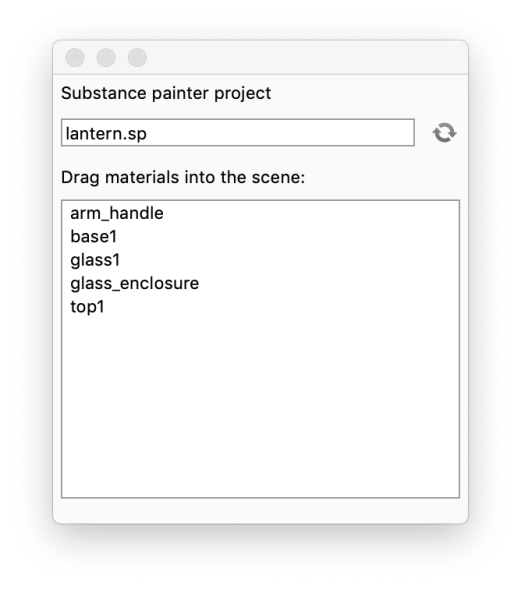
The Material Importer converts Substance Painter Texture Sets into the Generic material. Substance Painter projects are generally created for a specific model, so these materials are not added to the Library automatically. They appear in a temporary library where you can drag and drop them onto the model. This keeps materials you only need once out of your Library.
|
Read more about Substance Painter Texture Sets.